
This post describes how to run a pre-configured lab topology with Traffic Dictator and Cisco XRd or Arista cEOS. It is a good way to get familiar with Traffic Dictator and Segment Routing.
For more custom configurations, please check Traffic Dictator Documentation.
Pre-requisites
1. Setup Docker and Containerlab as described here: https://containerlab.dev/install/
2. Download and import the container images that you will use.
Cisco XRd: https://containerlab.dev/manual/kinds/xrd/
https://xrdocs.io/virtual-routing/tutorials/2022-08-22-xrd-images-where-can-one-get-them/
Note: a Cisco account and contract are required to download XRd images; or use your creativity to get them elsewhere
Arista cEOS: https://containerlab.dev/manual/kinds/ceos/
cEOS-lab is available for download from Arista website after registration; no contract is required
Very simple lab with Cisco XRd and OSPF
This lab features:
- OSPF topology of just 6 routers, IPv4 only
- 2 Egress Peers with BGP Peer SID
- BGP-LS is used to collect IGP and EPE topology information, BGP SR-TE is used to install policies
- A variety of SR-TE policies with different constraints, endpoint and path types
Topology diagram

Lab configs
Download lab configs from: https://vegvisir.ie/wp-content/uploads/dist/TD_ospf_very_simple.tar.gz
Upload to your containerlab host and extract the archive:
sudo tar -xvf TD_ospf_very_simple.tar.gz
Edit the file “TD_ospf_very_simple.clab.yml” to change your XRd container image name to appropriate release (if it’s not 7.10.2).
Run the lab
sudo containerlab deploy
Wait for several minutes for all nodes to start.
Use the lab
Connect to Traffic Dictator:
sudo docker exec -ti clab-TD_ospf_very_simple-traffic-dictator /bin/bash
From inside container, verify TD is running:
root@TD1:/# systemctl status td
● td.service - Vegvisir Systems Traffic Dictator
     Loaded: loaded (/etc/systemd/system/td.service; enabled; preset: enabled)
     Active: active (running) since Tue 2024-06-11 07:49:47 UTC; 11min ago
       Docs: https://vegvisir.ie/
   Main PID: 10653 (traffic_dictato)
      Tasks: 23 (limit: 10834)
     Memory: 143.5M
        CPU: 24.677s
     CGroup: /system.slice/td.service
             ├─10653 /bin/bash /usr/local/td/traffic_dictator_start.sh
             ├─10655 /usr/local/td/td_policy_engine
             ├─10662 python3 /usr/local/td/traffic_dictator.py
             ├─10667 python3 /usr/local/td/traffic_dictator.py
             ├─10678 python3 /usr/local/td/traffic_dictator.py
             ├─10692 python3 /usr/local/td/traffic_dictator.py
             ├─10694 python3 /usr/local/td/traffic_dictator.py
             └─10696 python3 /usr/local/td/traffic_dictator.py
Connect to TDCLI and verify policies:
root@TD1:/# tdcli
### Welcome to the Traffic Dictator CLI! ###
TD1#show traffic-eng policy
Traffic-eng policy information
Status codes: * valid, > active, e - EPE only, s - admin down, m - multi-topology
       Policy name                             Headend             Endpoint            Color/Service loopback   Protocol             Reserved bandwidth        Priority   Status/Reason
   *>  R1_ISP2_BLUE_ONLY                       1.1.1.1             10.100.9.102        104                      SR-TE/direct         100000000                 7/7        Active
   *>  R1_NULL_YELLOW_ONLY                     1.1.1.1             0.0.0.0             105                      SR-TE/direct         100000000                 7/7        Active
   *>  R1_R3_YELLOW_ONLY                       1.1.1.1             3.3.3.3             103                      SR-TE/direct         100000000                 7/7        Active
   *>  R1_R5_EXPLICIT                          1.1.1.1             5.5.5.5             101                      SR-TE/direct         100000000                 7/7        Active
   *>  R1_R6_BLUE_ONLY                         1.1.1.1             6.6.6.6             102                      SR-TE/direct         100000000                 7/7        Active
Configure and verify an SR-TE policy
Take for example policy “R1_R6_BLUE_ONLY”:
TD1#show run | sec R1_R6_BLUE_ONLY
   policy R1_R6_BLUE_ONLY
      headend 1.1.1.1 topology-id 101
      endpoint 6.6.6.6 color 102
      binding-sid 15102
      priority 7 7
      install direct srte 192.168.0.101
      !
      candidate-path preference 100
         affinity-set BLUE_ONLY
         bandwidth 100 mbps
Verify policy state:
TD1#show traffic-eng  policy R1_R6_BLUE_ONLY detail
Detailed traffic-eng policy information:

Traffic engineering policy "R1_R6_BLUE_ONLY"

    Valid config, Active
    Headend 1.1.1.1, topology-id 101, Maximum SID depth: 10
    Endpoint 6.6.6.6, color 102
        Endpoint type: Node, Topology-id: 101, Protocol: ospf, Router-id: 6.6.6.6

    Setup priority: 7, Hold priority: 7
    Reserved bandwidth bps: 100000000
    Install direct, protocol srte, peer 192.168.0.101
    Policy index: 4, SR-TE distinguisher: 16777220
    Binding-SID: 15102

    Candidate paths:
        Candidate-path preference 100
            Path config valid
            Metric: igp
            Path-option: dynamic
            Affinity-set: BLUE_ONLY
                Constraint: include-all
                List: ['BLUE']
                Value: 0x1
            This path is currently active

    Calculation results:
        Aggregate metric: 3
        Topologies: ['101']
        Segment lists:
            [16005, 16006]

    Policy statistics:
        Last config update: 2024-06-19 14:16:36,093
        Last recalculation: 2024-06-19 14:28:47.452
        Policy calculation took 0 miliseconds
BGP route has been created and sent to 192.168.0.101:
TD1#show bgp ipv4 srte detail | grep -B8 R1_R6_BLUE_ONLY

BGP routing table entry for [96][16777220][102][6.6.6.6]
Paths: 1 available, best #1
  Last modified: September 05, 2024 16:33:13
  Local, inserted
    - from - (0.0.0.0)
      Origin igp, metric 0, localpref -, weight 0, valid, -, best
      Endpoint 6.6.6.6, Color 102, Distinguisher 16777220
      Tunnel encapsulation attribute: SR Policy
          Policy name: R1_R6_BLUE_ONLY
TD1#show bgp neighbors 192.168.0.101 ipv4 srte advertised-routes | fgrep [96][16777220][102][6.6.6.6]

*>+       [96][16777220][102][6.6.6.6]                                           -                      0             -        0        i
On Cisco router, verify that the policy has been received and installed:
RP/0/RP0/CPU0:R1#show bgp ipv4 sr-policy [16777220][102][6.6.6.6]/96
Thu Sep  5 16:36:25.065 UTC
BGP routing table entry for [16777220][102][6.6.6.6]/96
Versions:
  Process           bRIB/RIB  SendTblVer
  Speaker                   5            5
Last Modified: Sep  5 16:33:13.446 for 00:03:11
Paths: (1 available, best #1, not advertised to any peer)
  Not advertised to any peer
  Path #1: Received by speaker 0
  Not advertised to any peer
  65001
    192.168.0.1 from 192.168.0.1 (111.111.111.111)
      Origin IGP, localpref 100, valid, external, best, group-best
      Received Path ID 0, Local Path ID 1, version 5
      Community: no-advertise
      Tunnel encap attribute type: 15 (SR policy)
       bsid 15102, preference 100, num of segment-lists 1
       segment-list 1, weight 1
        segments: {16005} {16006}
       Candidate path is usable (registered)
       SR policy state is UP, Allocated bsid 15102
RP/0/RP0/CPU0:R1#show segment-routing traffic-eng policy endpoint ipv4 6.6.6.6 color 102
Thu Sep  5 16:36:52.360 UTC

SR-TE policy database
---------------------

Color: 102, End-point: 6.6.6.6
  Name: srte_c_102_ep_6.6.6.6
  Status:
    Admin: up  Operational: up for 00:03:38 (since Sep  5 16:33:14.067)
  Candidate-paths:
    Preference: 100 (BGP, RD: 16777220) (active)
      Requested BSID: 15102
      Constraints:
        Protection Type: protected-preferred
        Maximum SID Depth: 10
      Explicit: segment-list  (valid)
        Weight: 1, Metric Type: TE
          SID[0]: 16005 [Prefix-SID, 5.5.5.5]
          SID[1]: 16006
  Attributes:
    Binding SID: 15102 (SRLB)
    Forward Class: Not Configured
    Steering labeled-services disabled: no
    Steering BGP disabled: no
    IPv6 caps enable: yes
    Invalidation drop enabled: no
    Max Install Standby Candidate Paths: 0
Lab with Cisco XRd and IS-IS
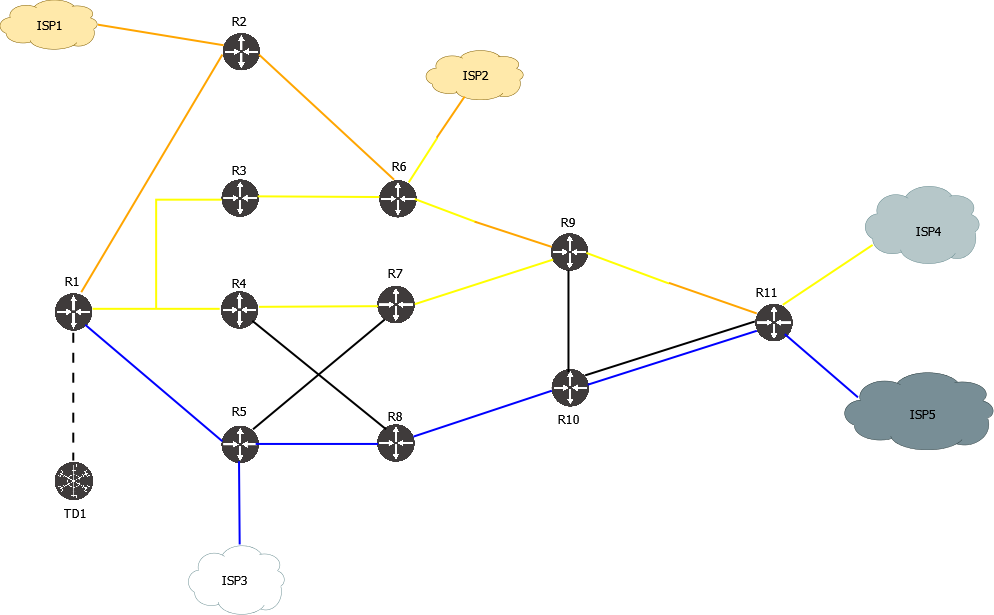
Note: this lab also requires an Arista cEOS switch with empty config to faciliate a multi-point connection between R1, R3 and R4.
This lab features:
- IS-IS L2 topology, IPv4 and IPv6
- 5 Egress Peers with BGP Peer SID, IPv4 and IPv6
- Broadcast network with IS-IS pseudonode
- Anycast SID
- A variety of IPv4 and IPv6 SR-TE policies with different constraints, endpoint and path types
- BGP-LS is used to collect IGP and EPE topology information, BGP SR-TE is used to install policies
- BGP SR-TE and PCEP are used to install policies
Topology diagram
Lab configs
Download lab configs from: https://vegvisir.ie/wp-content/uploads/dist/TD_isis_simple.tar.gz
Upload to your containerlab host and extract the archive:
sudo tar -xvf TD_isis_simple.tar.gz
Edit the file “TD_isis_simple.clab.yml” to change your XRd container image name to appropriate release (if it’s not 7.10.2).
Run the lab
sudo containerlab deploy
Wait for several minutes for all nodes to start.
Use the lab
Connect to Traffic Dictator:
sudo docker exec -ti clab-TD_isis_simple-traffic-dictator /bin/bash
From inside container, verify TD is running:
root@TD1:/# systemctl status td
● td.service - Vegvisir Systems Traffic Dictator
     Loaded: loaded (/etc/systemd/system/td.service; enabled; preset: enabled)
     Active: active (running) since Tue 2024-06-11 07:49:47 UTC; 11min ago
       Docs: https://vegvisir.ie/
   Main PID: 10653 (traffic_dictato)
      Tasks: 23 (limit: 10834)
     Memory: 143.5M
        CPU: 24.677s
     CGroup: /system.slice/td.service
             ├─10653 /bin/bash /usr/local/td/traffic_dictator_start.sh
             ├─10655 /usr/local/td/td_policy_engine
             ├─10662 python3 /usr/local/td/traffic_dictator.py
             ├─10667 python3 /usr/local/td/traffic_dictator.py
             ├─10678 python3 /usr/local/td/traffic_dictator.py
             ├─10692 python3 /usr/local/td/traffic_dictator.py
             ├─10694 python3 /usr/local/td/traffic_dictator.py
             └─10696 python3 /usr/local/td/traffic_dictator.py
Connect to TDCLI and verify policies:
root@TD1:/# tdcli
### Welcome to the Traffic Dictator CLI! ###
TD1#show bgp su
BGP summary information
Router identifier 111.111.111.111, local AS number 65001
  Neighbor             V    AS          MsgRcvd  MsgSent      InQ     OutQ      Up/Down    State          Received NLRI    Active AF
  192.168.0.101        4    65002           106       15        0        0      0:13:27    Established              164    IPv4-LU, LS
  2001:192::101        4    65002           103       35        0        0      0:12:22    Established              164    IPv4-SRTE, IPv6-LU, IPv6-SRTE, LS

TD1#show pcep su
PCEP summary information
  Neighbor             V    Session ID      SRP ID      MsgRcvd  MsgSent      InQ     OutQ      Up/Down    State
  192.168.0.101        1    1/1             6                92       84        0        0      0:37:31    SessionUp

TD1#show traffic-eng policy
Traffic-eng policy information
Status codes: * valid, > active, r - RSVP-TE, e - EPE only, s - admin down, m - multi-topology
Endpoint codes: * active override
        Policy name                             Headend             Endpoint            Color/Service loopback   Protocol             Reserved bandwidth        Priority   Status/Reason
    *>  R11_R1_BLUE_OR_ORANGE_IPV4              11.11.11.11         1.1.1.1             3                        SR-TE/indirect       100000000                 5/5        Active
    *>  R11_R1_BLUE_OR_ORANGE_IPV6              11.11.11.11         2002::1             103                      SR-TE/indirect       100000000                 5/5        Active
    *>  R1_ISP4_ANY_COLOR_IPV4                  1.1.1.1             10.100.19.104       5                        SR-TE/direct         100000000                 7/7        Active
    *>  R1_ISP4_ANY_COLOR_IPV6                  1.1.1.1             2001:100:19::104    105                      SR-TE/direct         100000000                 7/7        Active
    *>  R1_ISP5_BLUE_ONLY_IPV4                  1.1.1.1             10.100.20.105       4                        PCEP/direct          100000000                 7/7        Active
    *>  R1_ISP5_BLUE_ONLY_IPV6                  1.1.1.1             2001:100:20::105    104                      SR-TE/direct         100000000                 7/7        Active
    *>  R1_NULL_EXCLUDE_YELLOW_AND_ORANGE_IPV4  1.1.1.1             0.0.0.0             7                        PCEP/direct          100000000                 7/7        Active
    *>  R1_NULL_EXCLUDE_YELLOW_AND_ORANGE_IPV6  1.1.1.1             ::                  107                      SR-TE/direct         100000000                 7/7        Active
    *>  R1_NULL_YELLOW_ONLY_IPV4                1.1.1.1             0.0.0.0             6                        SR-TE/direct         100000000                 7/7        Active
    *>  R1_NULL_YELLOW_ONLY_IPV6                1.1.1.1             ::                  106                      SR-TE/direct         100000000                 7/7        Active
    *>  R1_R11_BLUE_ONLY_IPV4                   1.1.1.1             11.11.11.11         1                        SR-TE/direct         100000000                 7/7        Active
    *>  R1_R11_BLUE_ONLY_IPV6                   1.1.1.1             2002::11            101                      SR-TE/direct         100000000                 7/7        Active
    *>  R1_R11_EP_LOOSE_IPV4                    1.1.1.1             11.11.11.11         9                        SR-TE/direct         100000000                 4/4        Active
    *>  R1_R11_EP_LOOSE_IPV6                    1.1.1.1             2002::11            109                      SR-TE/direct         100000000                 4/4        Active
    *>  R1_R11_EXCLUDE_SOME_IPV4                1.1.1.1             11.11.11.11         10                       SR-TE/direct         100000000                 4/4        Active
    *>  R1_R11_EXCLUDE_SOME_IPV6                1.1.1.1             2002::11            110                      SR-TE/direct         100000000                 4/4        Active
    *>  R1_R11_YELLOW_OR_ORANGE_IPV4            1.1.1.1             11.11.11.11         2                        SR-TE/direct         100000000                 6/6        Active
    *>  R1_R11_YELLOW_OR_ORANGE_IPV6            1.1.1.1             2002::11            102                      SR-TE/direct         100000000                 6/6        Active
    *>  R1_R9_EP_STRICT_IPV4                    1.1.1.1             9.9.9.9             109                      PCEP/direct          100000000                 4/4        Active
    *>  R1_R9_EP_STRICT_IPV6                    1.1.1.1             2002::9             108                      SR-TE/direct         100000000                 4/4        Active
Configure and verify an SR-TE policy
Take for example, policy “R1_R11_BLUE_ONLY_IPV4”.
TD1#show run | sec R1_R11_BLUE_ONLY_IPV4
   policy R1_R11_BLUE_ONLY_IPV4
      headend 1.1.1.1 topology-id 101
      endpoint 11.11.11.11 color 1
      binding-sid 15001
      priority 7 7
      install direct srte 2001:192::101
      !
      candidate-path preference 100
         metric igp
         affinity-set BLUE_ONLY
         bandwidth 100 mbps
Verify policy state:
TD1#show traffic-eng policy R1_R11_BLUE_ONLY_IPV4 detail
Detailed traffic-eng policy information:

Traffic engineering policy "R1_R11_BLUE_ONLY_IPV4"

    Valid config, Active
    Headend 1.1.1.1, topology-id 101, Maximum SID depth: 10
    Endpoint 11.11.11.11, color 1
        Endpoint type: Node, Topology-id: 101, Protocol: isis, Router-id: 0011.0011.0011.00

    Setup priority: 7, Hold priority: 7
    Reserved bandwidth bps: 100000000
    Install direct, protocol srte, peer 2001:192::101
    Policy index: 10, SR-TE distinguisher: 16777226
    Binding-SID: 15001

    Candidate paths:
        Candidate-path preference 100
            Path config valid
            Metric: igp
            Path-option: dynamic
            Affinity-set: BLUE_ONLY
                Constraint: include-all
                List: ['BLUE']
                Value: 0x1
            This path is currently active

    Calculation results:
        Aggregate metric: 40
        Topologies: ['101']
        Segment lists:
            [16005, 16010, 24013]

    Policy statistics:
        Last config update: 2024-09-05 16:48:27,660
        Last recalculation: 2024-09-05 16:50:20.473
        Policy calculation took 0 miliseconds
BGP route has been created and sent to 2001:192::101:
TD1#show bgp ipv4 srte detail | grep -B8 R1_R11_BLUE_ONLY_IPV4

BGP routing table entry for [96][16777226][1][11.11.11.11]
Paths: 1 available, best #1
  Last modified: September 05, 2024 16:50:20
  Local, inserted
    - from - (0.0.0.0)
      Origin igp, metric 0, localpref -, weight 0, valid, -, best
      Endpoint 11.11.11.11, Color 1, Distinguisher 16777226
      Tunnel encapsulation attribute: SR Policy
          Policy name: R1_R11_BLUE_ONLY_IPV4
TD1#show bgp neighbors 2001:192::101 ipv4 srte advertised-routes | fgrep [96][16777226][1][11.11.11.11]

*>+       [96][16777226][1][11.11.11.11]                                         -                      0             -        0        i
On Cisco router, verify that the policy has been received and installed:
RP/0/RP0/CPU0:R1#show bgp ipv4 sr-policy [16777226][1][11.11.11.11]/96
Thu Sep  5 16:59:25.260 UTC
BGP routing table entry for [16777226][1][11.11.11.11]/96
Versions:
  Process           bRIB/RIB  SendTblVer
  Speaker                  12           12
Last Modified: Sep  5 16:50:14.895 for 00:09:10
Paths: (1 available, best #1, not advertised to any peer)
  Not advertised to any peer
  Path #1: Received by speaker 0
  Not advertised to any peer
  65001
    2001:192::a8c1:abff:fe54:2578 from 2001:192::1 (111.111.111.111)
      Origin IGP, localpref 100, valid, external, best, group-best
      Received Path ID 0, Local Path ID 1, version 12
      Community: no-advertise
      Tunnel encap attribute type: 15 (SR policy)
       bsid 15001, preference 100, num of segment-lists 1
       segment-list 1, weight 1
        segments: {16005} {16010} {24013}
       Candidate path is usable (registered)
       SR policy state is UP, Allocated bsid 15001
show segment-routing traffic-eng policy endpoint ipv4 11.11.11.11 color 1
Thu Sep  5 16:59:39.420 UTC

SR-TE policy database
---------------------

Color: 1, End-point: 11.11.11.11
  Name: srte_c_1_ep_11.11.11.11
  Status:
    Admin: up  Operational: up for 00:09:23 (since Sep  5 16:50:16.217)
  Candidate-paths:
    Preference: 100 (BGP, RD: 16777226) (active)
      Requested BSID: 15001
      Constraints:
        Protection Type: protected-preferred
        Maximum SID Depth: 10
      Explicit: segment-list  (valid)
        Weight: 1, Metric Type: TE
          SID[0]: 16005 [Prefix-SID, 5.5.5.5]
          SID[1]: 16010
          SID[2]: 24013
  Attributes:
    Binding SID: 15001 (SRLB)
    Forward Class: Not Configured
    Steering labeled-services disabled: no
    Steering BGP disabled: no
    IPv6 caps enable: yes
    Invalidation drop enabled: no
    Max Install Standby Candidate Paths: 0
Configure and verify a PCEP policy
TD1#show run | sec R1_R9_EP_STRICT_IPV4
   policy R1_R9_EP_STRICT_IPV4
      headend 1.1.1.1 topology-id 101
      endpoint 9.9.9.9 color 109
      binding-sid 15008
      priority 4 4
      install direct pcep 192.168.0.101
      !
      candidate-path preference 100
         explicit-path R5_R8_R10
         bandwidth 100 mbps
Verify PCEP route status:
TD1#show pcep ipv4 sr-te
PCEP SR-TE routing table information
Status codes: * acked, > up/active, + - inserted, z - zombie

          NLRI                                      PLSP-ID    Oper status
*>+       [96][16777234][109][9.9.9.9]                    1    Active (2)
*>+       [96][16777220][4][10.100.20.105]                2    Active (2)
*>+       [96][16777222][7][0.0.0.0]                      3    Active (2)
TD1#show pcep ipv4 sr-te [96][16777234][109][9.9.9.9]
PCEP SR-TE routing table information

PCEP routing table entry for [96][16777234][109][9.9.9.9]
    Policy name: R1_R9_EP_STRICT_IPV4
    Headend: 1.1.1.1
    Endpoint: 9.9.9.9, Color 109
    Install peer: 192.168.0.101
    Last modified: February 07, 2025 13:40:49
      Route acked by PCC, PLSP-ID 1
        LSP-ID     Oper status
             2      Active (2)
      Metric type igp, metric 40
      Binding SID: 15008
      Segment list: [16005, 16008, 16009]
On Cisco router, verify that the policy has been received and installed:
RP/0/RP0/CPU0:R1#show segment-routing traffic-eng pcc lsp
Fri Feb  7 13:47:27.462 UTC

PCC's SR policy database:
-------------------------
Symbolic Name: R1_R9_EP_STRICT_IPV4
 LSP[0]:
  Source 1.1.1.1, Destination 9.9.9.9, Tunnel ID 18, LSP ID 2
  State: Admin up, Operation active
  Setup type: SR
  Binding SID: 15008
Lab with Arista cEOS
This lab features:
- IS-IS L2 topology, IPv4 only
- 5 Egress Peers with BGP-LU originated EPE routes, IPv4 only
- Anycast SID
- A variety of IPv4 SR-TE and LU policies with different constraints, endpoint and path types
- BGP-LS is used to collect IGP topology information, BGP-LU is used to collect EPE topology information, BGP SR-TE and LU are used to install policies
Topology diagram
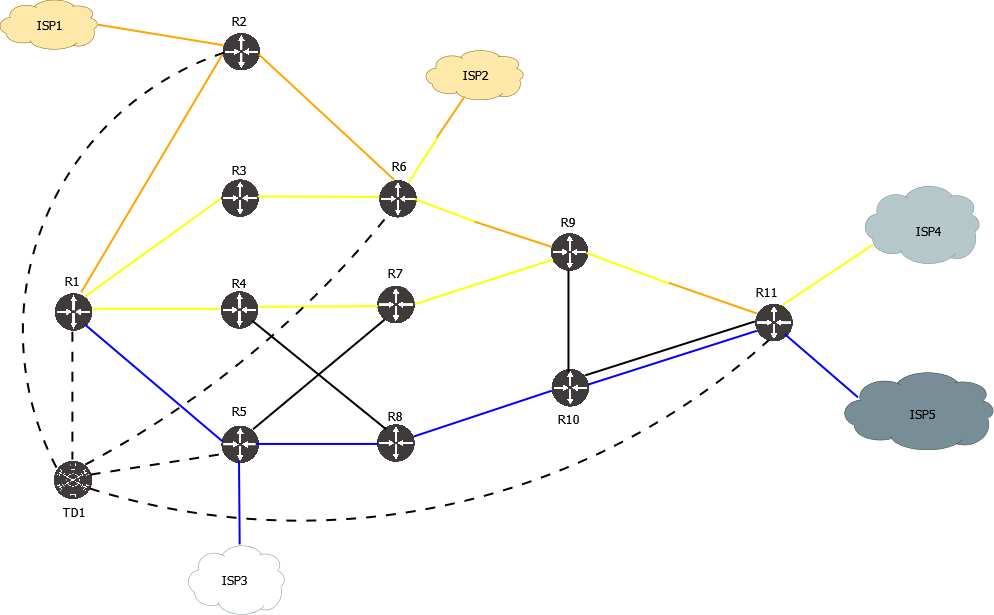
Note that unlike the XRd lab, in this one TD has BGP-LU sessions with all egress ASBR. This is because EOS doesn’t support Peer SID but instead advertises EPE routes via BGP-LU.
Update 01.08.2024: replaced XRd image used for ISP with FRR image. So this lab now requires only free images.
Lab configs
Download lab configs from: https://vegvisir.ie/wp-content/uploads/dist/TD_isis_eos_simple_frr.tar.gz
Upload to your containerlab host and extract the archive:
sudo tar -xvf TD_isis_eos_simple_frr.tar.gz
Edit the file “TD_isis_eos_simple_frr.clab.yml” to change your cEOS container image name to appropriate release.
Run the lab
sudo containerlab deploy
Wait for several minutes for all nodes to start.
Use the lab
Connect to Traffic Dictator:
sudo docker exec -ti clab-TD_isis_eos_simple-traffic-dictator /bin/bash
From inside container, verify TD is running:
root@TD1:/# systemctl status td
● td.service - Vegvisir Systems Traffic Dictator
     Loaded: loaded (/etc/systemd/system/td.service; enabled; preset: enabled)
     Active: active (running) since Tue 2024-06-11 07:49:47 UTC; 11min ago
       Docs: https://vegvisir.ie/
   Main PID: 10653 (traffic_dictato)
      Tasks: 23 (limit: 10834)
     Memory: 143.5M
        CPU: 24.677s
     CGroup: /system.slice/td.service
             ├─10653 /bin/bash /usr/local/td/traffic_dictator_start.sh
             ├─10655 /usr/local/td/td_policy_engine
             ├─10662 python3 /usr/local/td/traffic_dictator.py
             ├─10667 python3 /usr/local/td/traffic_dictator.py
             ├─10678 python3 /usr/local/td/traffic_dictator.py
             ├─10692 python3 /usr/local/td/traffic_dictator.py
             ├─10694 python3 /usr/local/td/traffic_dictator.py
             └─10696 python3 /usr/local/td/traffic_dictator.py
Connect to TDCLI and verify policies:
root@TD1:/# tdcli
### Welcome to the Traffic Dictator CLI! ###
TD1#sh bgp su
BGP summary information
Router identifier 111.111.111.111, local AS number 65001
  Neighbor             V    AS          MsgRcvd  MsgSent      InQ     OutQ      Up/Down    State          Received NLRI    Active AF
  192.168.0.101        4    65002            65       10        0        0      0:00:50    Established              100    IPv4-LU, IPv4-SRTE, LS
  192.168.0.102        4    65002             5        3        0        0      0:00:50    Established                1    IPv4-LU
  192.168.0.105        4    65002            12        9        0        0      0:07:29    Established                1    IPv4-LU
  192.168.0.106        4    65002             5        3        0        0      0:00:50    Established                1    IPv4-LU
  192.168.0.111        4    65002            12       15        0        0      0:05:48    Established                2    IPv4-LU
TD1#show traf pol
Traffic-eng policy information
Status codes: * valid, > active, e - EPE only, s - admin down, m - multi-topology
       Policy name                             Headend             Endpoint            Color/Service loopback   Protocol             Reserved bandwidth        Priority   Status/Reason
   *>  R11_R1_BLUE_OR_ORANGE_IPV4              11.11.11.11         1.1.1.1             3                        SR-TE/direct         100000000                 5/5        Active
   *>  R1_ISP4_ANY_COLOR_IPV4                  1.1.1.1             10.100.19.104       5                        SR-TE/direct         100000000                 7/7        Active
 e *>  R1_ISP4_EPE_ONLY                        N/A                 10.100.19.104       103.11.11.11             LU/direct            100000000                 7/7        Active
   *>  R1_ISP5_BLUE_ONLY_IPV4                  1.1.1.1             10.100.20.105       102.11.11.11             LU/direct            100000000                 7/7        Active
   *>  R1_NULL_EXCLUDE_YELLOW_AND_ORANGE_IPV4  1.1.1.1             0.0.0.0             7                        SR-TE/direct         100000000                 7/7        Active
   *>  R1_NULL_YELLOW_ONLY_IPV4                1.1.1.1             0.0.0.0             6                        SR-TE/direct         100000000                 7/7        Active
   *>  R1_R11_BLUE_ONLY_IPV4                   1.1.1.1             11.11.11.11         100.11.11.11             LU/direct            100000000                 7/7        Active
   *>  R1_R11_EP_LOOSE_IPV4                    1.1.1.1             11.11.11.11         9                        SR-TE/direct         100000000                 4/4        Active
   *>  R1_R11_EXCLUDE_SOME_IPV4                1.1.1.1             11.11.11.11         10                       SR-TE/direct         100000000                 4/4        Active
   *>  R1_R11_YELLOW_OR_ORANGE_IPV4            1.1.1.1             11.11.11.11         2                        SR-TE/direct         100000000                 6/6        Active
   *>  R1_R9_EP_STRICT_IPV4                    1.1.1.1             9.9.9.9             8                        SR-TE/direct         100000000                 4/4        Active
Configure and verify an SR-TE policy
Take for example policy “R1_R11_EP_LOOSE_IPV4”:
TD1#show run | sec R1_R11_EP_LOOSE_IPV4
   policy R1_R11_EP_LOOSE_IPV4
      headend 1.1.1.1 topology-id 101
      endpoint 11.11.11.11 color 9
      binding-sid 966005
      priority 4 4
      install direct srte 192.168.0.101
      !
      candidate-path preference 100
         explicit-path R25_LOOSE
         bandwidth 100 mbps
It has been resolved via anycast SID shared between R2 and R5:
TD1#show traffic-eng policy R1_R11_EP_LOOSE_IPV4 detail
Detailed traffic-eng policy information:

Traffic engineering policy "R1_R11_EP_LOOSE_IPV4"

    Valid config, Active
    Headend 1.1.1.1, topology-id 101, Maximum SID depth: 6
    Endpoint 11.11.11.11, color 9
        Endpoint type: Node, Topology-id: 101, Protocol: isis, Router-id: 0011.0011.0011.00

    Setup priority: 4, Hold priority: 4
    Reserved bandwidth bps: 100000000
    Install direct, protocol srte, peer 192.168.0.101
    Policy index: 7, SR-TE distinguisher: 16777223
    Binding-SID: 966005

    Candidate paths:
        Candidate-path preference 100
            Path config valid
            Metric: igp
            Path-option: explicit
                Explicit path name: R25_LOOSE
            This path is currently active

    Calculation results:
        Aggregate metric: 400
        Topologies: ['101']
        Segment lists:
            [900025, 900011]

    Policy statistics:
        Last config update: 2024-09-05 17:28:56,025
        Last recalculation: 2024-09-05 17:34:59.568
        Policy calculation took 1 miliseconds
Verify BGP route created and advertised to peer:
TD1#show bgp ipv4 srte detail | grep -B8 R1_R11_EP_LOOSE_IPV4

BGP routing table entry for [96][16777223][9][11.11.11.11]
Paths: 1 available, best #1
  Last modified: September 05, 2024 17:35:00
  Local, inserted
    - from - (0.0.0.0)
      Origin igp, metric 0, localpref -, weight 0, valid, -, best
      Endpoint 11.11.11.11, Color 9, Distinguisher 16777223
      Tunnel encapsulation attribute: SR Policy
          Policy name: R1_R11_EP_LOOSE_IPV4
TD1#show bgp neighbors 192.168.0.101 ipv4 srte advertised-routes | fgrep [96][16777223][9][11.11.11.11]

*>+       [96][16777223][9][11.11.11.11]                                  -                      0             -        0        i
Verify SR-TE policy on EOS:
R1#show bgp sr-te endpoint 11.11.11.11 color 9 distinguisher 16777223
BGP routing table information for VRF default
Router identifier 1.1.1.1, local AS number 65002
BGP routing table entry for Endpoint: 11.11.11.11, Color: 9, Distinguisher: 16777223
 Paths: 1 available
  65001
    192.168.0.1 from 192.168.0.1 (111.111.111.111)
      Origin IGP, metric -, localpref 100, weight 0, received 00:01:08 ago, valid, external, best
      Community: no-advertise
      Rx SAFI: SR TE Policy
R1#show traffic-engineering segment-routing policy endpoint 11.11.11.11 color 9
Endpoint 11.11.11.11 Color 9, Counters: not available
        Path group: State: active (for 00:07:41), modified: 00:07:41 ago
                Protocol: BGP
                Originator: 111.111.111.111(AS65001)
                Discriminator: 16777223
                Preference: 100
                IGP metric: 0 (static)
                Binding SID: 966005
                Explicit null label policy: IPv6 (system default)
                Segment List: State: Valid, ID: 7, Counters: not available
                Protected: No, Reason: The top label is not protected
                        Label Stack: [900025 900011], Weight: 1
                        Resolved Label Stack: [900011], Next hop: 10.100.1.2, Interface: Ethernet1
                        Resolved Label Stack: [900011], Next hop: 10.100.3.5, Interface: Ethernet3
Configure and verify an LU policy
BGP-LU is an alternative method of policy installtion to routers that don’t support BGP SR-TE. Refer to the relevant documentation section: https://vegvisir.ie/bgp-lu-policies/
Policy “R1_ISP5_BLUE_ONLY_IPV4” has been configured as LU:
TD1#show run | sec R1_ISP5_BLUE_ONLY_IPV4
   policy R1_ISP5_BLUE_ONLY_IPV4
      headend 1.1.1.1 topology-id 101
      endpoint 10.100.20.105 service-loopback 102.11.11.11
      binding-sid 15004
      priority 7 7
      install direct labeled-unicast 192.168.0.101
      !
      candidate-path preference 100
         metric te
         affinity-set BLUE_ONLY
         bandwidth 100 mbps
It is also an EPE policy going to ISP5.
Verify:
TD1#show traffic-eng policy R1_ISP5_BLUE_ONLY_IPV4 detail
Detailed traffic-eng policy information:

Traffic engineering policy "R1_ISP5_BLUE_ONLY_IPV4"

    Valid config, Active
    Headend 1.1.1.1, topology-id 101, Maximum SID depth: 6
    Endpoint 10.100.20.105, service-loopback 102.11.11.11
        Endpoint type: Egress peer, Topology-id: 101, Protocol: isis, Router-id: 0011.0011.0011.00

    Setup priority: 7, Hold priority: 7
    Reserved bandwidth bps: 100000000
    Install direct, protocol labeled-unicast, peer 192.168.0.101
    Policy index: 3, SR-TE distinguisher: 16777219

    Candidate paths:
        Candidate-path preference 100
            Path config valid
            Metric: te
            Path-option: dynamic
            Affinity-set: BLUE_ONLY
                Constraint: include-all
                List: ['BLUE']
                Value: 0x1
            This path is currently active

    Calculation results:
        Aggregate metric: 2000
        Topologies: ['101']
        Segment lists:
            [900010, 100003, 100001]
        BGP-LU next-hop: 10.100.3.5

    Policy statistics:
        Last config update: 2024-09-06 10:40:56,270
        Last recalculation: 2024-09-06 10:41:16.650
        Policy calculation took 0 miliseconds
Verify the BGP route:
TD1#show bgp ipv4 labeled-unicast [16777219][102.11.11.11/32]
BGP-LS routing table information
Router identifier 111.111.111.111, local AS number 65001

BGP routing table entry for [16777219][102.11.11.11/32]
Label stack: [900010, 100003, 100001]
Paths: 1 available, best #1
  Last modified: September 06, 2024 10:41:16
  Local, inserted
    - from - (0.0.0.0)
      Origin igp, metric 0, localpref -, weight 0, valid, -, best
Verify the policy has been received on EOS:
R1#sh bgp ipv4 labeled-unicast 102.11.11.11/32
BGP routing table information for VRF default
Router identifier 1.1.1.1, local AS number 65002
BGP routing table entry for 102.11.11.11/32
 Paths: 2 available
  65001
    10.100.3.5 labels [ 900010 100003 100001 ] from 192.168.0.1 (111.111.111.111)
      Origin IGP, metric 0, localpref 500, IGP metric 0, weight 0, tag 0
      Received 00:16:21 ago, valid, external, best
      Community: no-advertise
      Local MPLS label: 100005
      Rx SAFI: MplsLabel
      Tunnel RIB eligible
R1#show bgp labeled-unicast tunnel | grep 102.11.11.11/32
   5           102.11.11.11/32        10.100.3.5                 Ethernet3       [ 900010 100003 100001 ]       Yes                   0 MED          0              200     0
Configure and verify an EPE-only policy
EPE only policy is useful for pure Egress Peer Engineering applications, where the network does not Segment Routing and does not advertise BGP-LS information to Traffic Dictator. Refer to the relevant documentation section: https://vegvisir.ie/epe-only-policies/
Take for example policy “R1_ISP4_EPE_ONLY”:
TD1#show run | sec R1_ISP4_EPE_ONLY
   policy R1_ISP4_EPE_ONLY
      endpoint 10.100.19.104 service-loopback 103.11.11.11
      epe-only
      priority 7 7
      install direct labeled-unicast 192.168.0.101
      !
      candidate-path preference 100
         bandwidth 100 mbps
Verify:
TD1#show traffic-eng policy R1_ISP4_EPE_ONLY detail
Detailed traffic-eng policy information:

Traffic engineering policy "R1_ISP4_EPE_ONLY"

    Valid config, Active
    This is an EPE-only policy
    Endpoint 10.100.19.104, service-loopback 103.11.11.11
        Endpoint type: Egress peer, Topology-id: None, Protocol: epe_only, Router-id: 11.11.11.11

    Setup priority: 7, Hold priority: 7
    Reserved bandwidth bps: 100000000
    Install direct, protocol labeled-unicast, peer 192.168.0.101
    Policy index: 2, SR-TE distinguisher: 16777218

    Candidate paths:
        Candidate-path preference 100
            Path config valid
            Metric: igp
            Path-option: dynamic
            This path is currently active

    Calculation results:
        Topologies: None
        Segment lists:
            [100000]
        BGP-LU next-hop: 11.11.11.11

    Policy statistics:
        Last config update: 2024-09-06 10:40:56,270
        Last recalculation: 2024-09-06 10:41:16.650
        Policy calculation took 0 miliseconds
Unlike a regular BGP-LU policy, Traffic Dictator sets BGP-LU nexthop not to the next router in IGP topology, but to the node IP configured under “traffic-eng nodes”. So the policy headend can recursively resolve that IP over its MPLS control plane. In this lab it’s SR, but can be also LDP, RSVP or BGP-LU.
Verify on EOS:
R1#sh bgp ipv4 labeled-unicast 103.11.11.11/32
BGP routing table information for VRF default
Router identifier 1.1.1.1, local AS number 65002
BGP routing table entry for 103.11.11.11/32
 Paths: 2 available
  65001
    11.11.11.11 labels [ 100000 ] from 192.168.0.1 (111.111.111.111)
      Origin IGP, metric 0, localpref 500, IGP metric 410, weight 0, tag 0
      Received 00:21:31 ago, valid, external, best
      Community: no-advertise
      Local MPLS label: 100006
      Rx SAFI: MplsLabel
      Tunnel RIB eligible
R1#show bgp labeled-unicast tunnel | grep 103.11.11.11/32
   7           103.11.11.11/32        IS-IS SR IPv4 (13)         -               [ 100000 ]                     Yes                   0 MED          0              200     0
Multi-domain lab with Cisco XRd
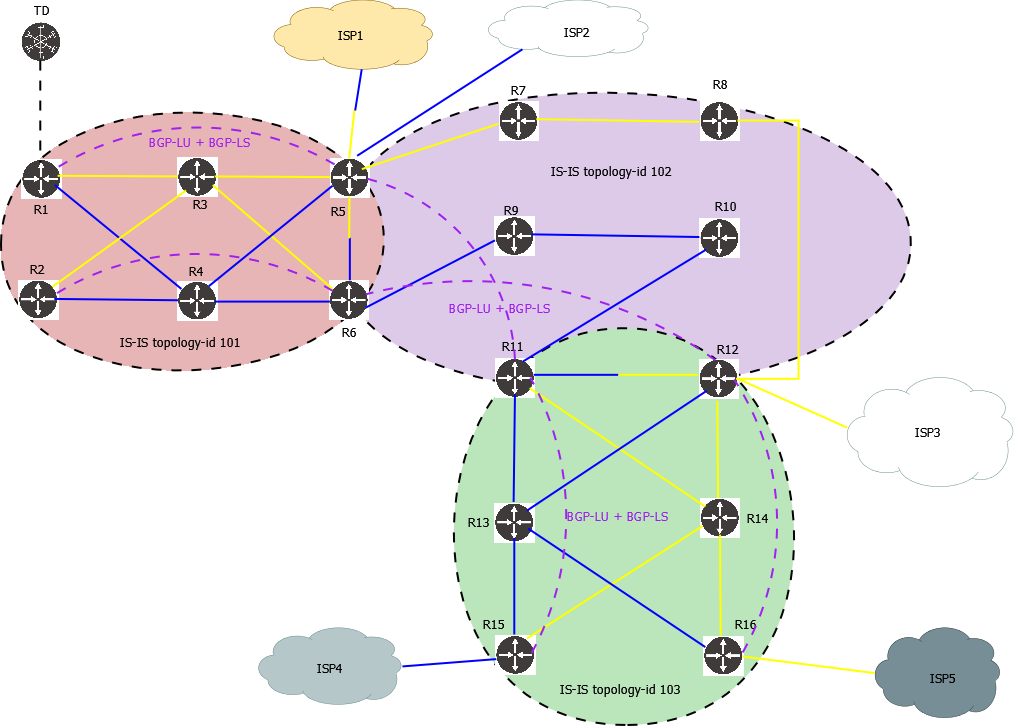
This lab features:
- Seamless MPLS network with 3 separate IS-IS instances, both IPv4 and IPv6
- BGP-LU is used for end-to-end connectivity across different IS-IS instances; no redistribution
- 5 Egress Peers with BGP Peer SID, IPv4 and IPv6
- Anycast SID
- A variety of IPv4 and IPv6 SR-TE multi-domain policies with different constraints, endpoint and path types
- BGP-LS is used to collect IGP and EPE topology information, BGP SR-TE is used to install policies
Topology diagram
Lab configs
Download lab configs from: https://vegvisir.ie/wp-content/uploads/dist/TD_isis_3topologies.tar.gz
Upload to your containerlab host and extract the archive:
sudo tar -xvf TD_isis_3topologies.tar.gz
Edit the file “TD_isis_3topologies.clab.yml” to change your XRd container image name to appropriate release (if it’s not 7.10.2).
Run the lab
sudo containerlab deploy
Wait for several minutes for all nodes to start.
Use the lab
Connect to Traffic Dictator:
sudo docker exec -ti clab-TD_isis_3topologies-traffic-dictator /bin/bash
From inside container, verify TD is running:
root@TD1:/# systemctl status td
● td.service - Vegvisir Systems Traffic Dictator
     Loaded: loaded (/etc/systemd/system/td.service; enabled; preset: enabled)
     Active: active (running) since Tue 2024-06-11 07:49:47 UTC; 11min ago
       Docs: https://vegvisir.ie/
   Main PID: 10653 (traffic_dictato)
      Tasks: 23 (limit: 10834)
     Memory: 143.5M
        CPU: 24.677s
     CGroup: /system.slice/td.service
             ├─10653 /bin/bash /usr/local/td/traffic_dictator_start.sh
             ├─10655 /usr/local/td/td_policy_engine
             ├─10662 python3 /usr/local/td/traffic_dictator.py
             ├─10667 python3 /usr/local/td/traffic_dictator.py
             ├─10678 python3 /usr/local/td/traffic_dictator.py
             ├─10692 python3 /usr/local/td/traffic_dictator.py
             ├─10694 python3 /usr/local/td/traffic_dictator.py
             └─10696 python3 /usr/local/td/traffic_dictator.py
Connect to TDCLI and verify policies:
root@TD1:/# tdcli
### Welcome to the Traffic Dictator CLI! ###
TD1#show traf pol
Traffic-eng policy information
Status codes: * valid, > active, e - EPE only, s - admin down, m - multi-topology
Endpoint codes: * active override
       Policy name                             Headend             Endpoint            Color/Service loopback   Protocol             Reserved bandwidth        Priority   Status/Reason
  m*>  R1_ISP3_YELLOW_IPV4                     1.1.1.1             10.100.28.103       101                      SR-TE/direct         100000000                 7/7        Active
  m*>  R1_ISP3_YELLOW_IPV6                     1.1.1.1             2001:100:28::103    101                      SR-TE/direct         100000000                 7/7        Active
  m*>  R1_ISP3_YELLOW_IPV6_MIXED               1.1.1.1             2001:100:28::103    102                      SR-TE/direct         100000000                 7/7        Active
  m*>  R1_ISP4_BLUE_IPV4                       1.1.1.1             10.100.29.104       114                      SR-TE/direct         100000000                 7/7        Active
  m*>  R1_ISP4_BLUE_IPV6                       1.1.1.1             2001:100:29::104    115                      SR-TE/direct         100000000                 7/7        Active
  m*>  R1_R11_BLUE_IPV4                        1.1.1.1             11.11.11.11         100                      SR-TE/direct         100000000                 5/5        Active
  m*>  R1_R11_BLUE_IPV6                        1.1.1.1             2002::11            100                      SR-TE/direct         100000000                 5/5        Active
  m*>  R1_R15_STRICT_IPV4                      1.1.1.1             15.15.15.15         103                      SR-TE/direct         100000000                 7/7        Active
  m*>  R1_R15_STRICT_IPV6                      1.1.1.1             2002::15            103                      SR-TE/direct         100000000                 7/7        Active
  m*>  R1_R15_STRICT_MIXED                     1.1.1.1             15.15.15.15         104                      SR-TE/direct         100000000                 7/7        Active
  m*>  R1_R16_LOOSE_ANYCAST_IPV4               1.1.1.1             16.16.16.16         111                      SR-TE/direct         100000000                 7/7        Active
  m*>  R1_R16_LOOSE_ANYCAST_IPV6               1.1.1.1             2002::16            111                      SR-TE/direct         100000000                 7/7        Active
  m*>  R1_R16_LOOSE_ANYCAST_MIXED              1.1.1.1             16.16.16.16         112                      SR-TE/direct         100000000                 7/7        Active
Note letter “m” indicating those are multi-topology policies.
Configure and verify a multi-topology policy
Take for example a policy that goes through all 3 IGP domains and uses anycast SID shared between R5 and R6, and another anycast SID shared by R11 and R12.
Configuration:
traffic-eng policies
   !
   policy R1_R16_LOOSE_ANYCAST_IPV4
      headend 1.1.1.1 topology-id 101
      endpoint 16.16.16.16 color 111
      binding-sid 15011
      priority 7 7
      install direct srte 192.168.0.101
      !
      candidate-path preference 100
         explicit-path ANYCAST_IPV4
         metric igp
         bandwidth 100 mbps
!
traffic-eng explicit-paths
   !
   explicit-path ANYCAST_IPV4
      index 10 loose 56.56.56.56
      index 20 loose 11.11.12.12
56.56.56.56 is an anycast IP shared between R5 and R6; 11.11.12.12 is an anycast IP shared between R11 and R12.
Verify the policy:
TD1#show traffic-eng policy R1_R16_LOOSE_ANYCAST_IPV4 detail
Detailed traffic-eng policy information:

Traffic engineering policy "R1_R16_LOOSE_ANYCAST_IPV4"

    Valid config, Active
    Headend 1.1.1.1, topology-id 101, Maximum SID depth: 10
    Endpoint 16.16.16.16, color 111
        Endpoint type: Node, Topology-id: 103, Protocol: isis, Router-id: 0016.0016.0016.00

    Setup priority: 7, Hold priority: 7
    Reserved bandwidth bps: 100000000
    Install direct, protocol srte, peer 192.168.0.101
    Policy index: 10, SR-TE distinguisher: 16777226
    Binding-SID: 15011

    Candidate paths:
        Candidate-path preference 100
            Path config valid
            Metric: igp
            Path-option: explicit
                Explicit path name: ANYCAST_IPV4
            This path is currently active

    Calculation results:
        Aggregate metric: 70
        Topologies: ['101', '102', '103']
        Segment lists:
            [16056, 16112, 16016]

    Policy statistics:
        Last config update: 2024-09-06 10:26:46,386
        Last recalculation: 2024-09-06 10:28:36.840
        Policy calculation took 1 miliseconds
TD1#
Check the BGP SR-TE route:
TD1#show bgp ipv4 srte detail | grep -B8 R1_R16_LOOSE_ANYCAST_IPV4

BGP routing table entry for [96][16777226][111][16.16.16.16]
Paths: 1 available, best #1
  Last modified: September 06, 2024 10:28:37
  Local, inserted
    - from - (0.0.0.0)
      Origin igp, metric 0, localpref -, weight 0, valid, -, best
      Endpoint 16.16.16.16, Color 111, Distinguisher 16777226
      Tunnel encapsulation attribute: SR Policy
          Policy name: R1_R16_LOOSE_ANYCAST_IPV4
Verify on IOS-XR:
RP/0/RP0/CPU0:R1#show bgp ipv4 sr-policy [16777226][111][16.16.16.16]/96
Fri Sep  6 10:32:33.431 UTC
BGP routing table entry for [16777226][111][16.16.16.16]/96
Versions:
  Process           bRIB/RIB  SendTblVer
  Speaker                   8            8
Last Modified: Sep  6 10:28:37.191 for 00:03:56
Paths: (1 available, best #1, not advertised to any peer)
  Not advertised to any peer
  Path #1: Received by speaker 0
  Not advertised to any peer
  65001
    192.168.0.1 from 192.168.0.1 (111.111.111.111)
      Origin IGP, localpref 100, valid, external, best, group-best
      Received Path ID 0, Local Path ID 1, version 8
      Community: no-advertise
      Tunnel encap attribute type: 15 (SR policy)
       bsid 15011, preference 100, num of segment-lists 1
       segment-list 1, weight 1
        segments: {16056} {16112} {16016}
       Candidate path is usable (registered)
       SR policy state is UP, Allocated bsid 15011
RP/0/RP0/CPU0:R1#show segment-routing traffic-eng policy binding-sid 15011
Fri Sep  6 10:32:48.113 UTC

SR-TE policy database
---------------------

Color: 111, End-point: 16.16.16.16
  Name: srte_c_111_ep_16.16.16.16
  Status:
    Admin: up  Operational: up for 00:04:09 (since Sep  6 10:28:38.660)
  Candidate-paths:
    Preference: 100 (BGP, RD: 16777226) (active)
      Requested BSID: 15011
      Constraints:
        Protection Type: protected-preferred
        Maximum SID Depth: 10
      Explicit: segment-list  (valid)
        Weight: 1, Metric Type: TE
          SID[0]: 16056 [Prefix-SID, 56.56.56.56]
          SID[1]: 16112
          SID[2]: 16016
  Attributes:
    Binding SID: 15011 (SRLB)
    Forward Class: Not Configured
    Steering labeled-services disabled: no
    Steering BGP disabled: no
    IPv6 caps enable: yes
    Invalidation drop enabled: no
    Max Install Standby Candidate Paths: 0
Refer to the documentation about multi-domain policies for more details and examples.
Further information
For more details about Traffic Dictator configuration, refer to https://vegvisir.ie/documentation/
Check out also Traffic Dictator White Paper