
Summary
Traffic Dictator version 1.8 has been released on 31.08.2025. This article describes changes in the new version.
New features
SR-TE mesh templates
Mesh templates allow the operator to generate a set of similar SR-TE policies in a given topology, saving a lot of configuration and operational overhead.
This gives you the best of both Flex Algo (simple, minimalistic config) and traditional SR-TE policies (bandwidth reservations, path diversity, centralized view).
Config model:
traffic-eng mesh-templates
   template <name>
      topology-id <1-65535>
	  color <0-4294967295>
	  priority <0-7> <0-7>
	  access-list [ipv4|ipv6]
	  install indirect srte peer-group <name>
	  shutdown
	  !
	  candidate-path preference <0-4294967295>
             metric [igp|te|hop-count]
	     disjoint-group <1-65535> [link|node|srlg|srlg-node]
             affinity-set <name>
             bandwidth <1-100> [Kbps|Mbps|Gbps]
The config is similar to policies, but with fewer options. There is no explicit path, and the only install method is SR-TE indirect (i.e. via a route-reflector).
Consider the topology:
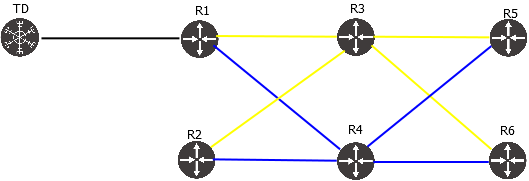
The following config will create a mesh of policies with constraint “use only blue links”:
traffic-eng mesh-templates
   !
   template TOPO_101_BLUE
      topology-id 101
      color 11101
      install indirect srte peer-group TOPO_101_RR
      !
      candidate-path preference 100
         affinity-set BLUE_ONLY
Verify:
TD1#sh traffic-eng mesh-template
Traffic-eng mesh-template information
Status codes: * valid, > active, r - RSVP-TE, s - admin down
        Template name                           Topology-id         Color      Protocol          Priority     Policies active/total
    *>  TOPO_101_BLUE                           101                 11101      SR-TE/indirect    7/7          40/60

TD1#sh traffic-eng mesh-template detail
Detailed traffic-eng mesh-template information:

Traffic engineering mesh-template "TOPO_101_BLUE"


    Valid config
    Topology-id: 101
    Color:       11101

    Setup priority: 7, Hold priority: 7
    Install indirect, protocol srte, peer-group TOPO_101_RR
        Install peer list:
            192.168.0.101
    SR-TE distinguisher: 1

    Candidate paths:
        Candidate-path preference 100
            Path config valid
            Metric: igp
            Path-option: dynamic
            Affinity-set: BLUE_ONLY
                Constraint: include-all
                List: ['BLUE']
                Value: 0x1

    Template statistics:
        Last config update: 2025-08-31 20:16:45,985
        Generated policies: 60
        Active policies:    40
Generation of policies from mesh templates
The following command will show all policies generated from a given template (output truncated for brevity):
TD1#sh traffic-eng mesh-template TOPO_101_BLUE policies | head -n 20

Traffic-eng policy information per mesh-template
-----
Mesh-template: TOPO_101_BLUE
Status codes: * valid, > active, s - admin down
        Policy name                             Headend             Endpoint            Color                    Protocol             Reserved bandwidth        Priority   Status/Reason
    *>  mesh_h1.1.1.1_e6.6.6.6_c11101           1.1.1.1             6.6.6.6             11101                    SR-TE/indirect       N/A                       7/7        Active
    *>  mesh_h4.4.4.4_e2.2.2.2_c11101           4.4.4.4             2.2.2.2             11101                    SR-TE/indirect       N/A                       7/7        Active
    *>  mesh_h1.1.1.1_e2002::4_c11101           1.1.1.1             2002::4             11101                    SR-TE/indirect       N/A                       7/7        Active
    *>  mesh_h5.5.5.5_e4.4.4.4_c11101           5.5.5.5             4.4.4.4             11101                    SR-TE/indirect       N/A                       7/7        Active
    *>  mesh_h1.1.1.1_e2002::5_c11101           1.1.1.1             2002::5             11101                    SR-TE/indirect       N/A                       7/7        Active
    *>  mesh_h6.6.6.6_e1.1.1.1_c11101           6.6.6.6             1.1.1.1             11101                    SR-TE/indirect       N/A                       7/7        Active
    *>  mesh_h4.4.4.4_e1.1.1.1_c11101           4.4.4.4             1.1.1.1             11101                    SR-TE/indirect       N/A                       7/7        Active
    *>  mesh_h4.4.4.4_e5.5.5.5_c11101           4.4.4.4             5.5.5.5             11101                    SR-TE/indirect       N/A                       7/7        Active
    *>  mesh_h1.1.1.1_e4.4.4.4_c11101           1.1.1.1             4.4.4.4             11101                    SR-TE/indirect       N/A                       7/7        Active
    *>  mesh_h6.6.6.6_e4.4.4.4_c11101           6.6.6.6             4.4.4.4             11101                    SR-TE/indirect       N/A                       7/7        Active
    *>  mesh_h1.1.1.1_e2002::6_c11101           1.1.1.1             2002::6             11101                    SR-TE/indirect       N/A                       7/7        Active
    *>  mesh_h4.4.4.4_e2002::2_c11101           4.4.4.4             2002::2             11101                    SR-TE/indirect       N/A                       7/7        Active
    *>  mesh_h5.5.5.5_e2002::4_c11101           5.5.5.5             2002::4             11101                    SR-TE/indirect       N/A                       7/7        Active
    *>  mesh_h6.6.6.6_e2.2.2.2_c11101           6.6.6.6             2.2.2.2             11101                    SR-TE/indirect       N/A                       7/7        Active
    *>  mesh_h1.1.1.1_e2.2.2.2_c11101           1.1.1.1             2.2.2.2             11101                    SR-TE/indirect       N/A                       7/7        Active
By default, mesh template will create a set of any-to-any policies, for both IPv4 and IPv6 (if the relevant prefix SID is available). Mesh is fully dynamic and policies will be added/deleted upon link state topology change. When creating a mesh in IS-IS L1 / OSPF non-zero area, TD checks basic SPF reachability between nodes, to avoid creating policies in a discontiguous area.
Exclude some routers from mesh
We can filter out the routers we don’t want to participate in the mesh, by using access lists.
For example, let’s make this template IPv4-only, and exclude R3 because it is not possible to reach it using blue links.
ipv4 access-list EXCLUDE_R3
   seq 10 deny 3.3.3.3/32
   seq 20 permit any
!
ipv6 access-list DENY_ANY
   seq 10 deny any
!
traffic-eng mesh-templates
   !
   template TOPO_101_BLUE
      topology-id 101
      color 11101
      access-list ipv4 EXCLUDE_R3
      access-list ipv6 DENY_ANY
      install indirect srte peer-group TOPO_101_RR
      !
      candidate-path preference 100
         affinity-set BLUE_ONLY
Now this template generates fewer policies, and all of them are active:
TD1#sh traffic-eng mesh-template TOPO_101_BLUE detail
Detailed traffic-eng mesh-template information:

Traffic engineering mesh-template "TOPO_101_BLUE"


    Valid config
    Topology-id: 101
    Color:       11101

    Setup priority: 7, Hold priority: 7
    Install indirect, protocol srte, peer-group TOPO_101_RR
        Install peer list:
            192.168.0.101
    SR-TE distinguisher: 1

    IPv4 access-list entries:
        seq 10 deny 3.3.3.3/32
        seq 20 permit any

    IPv6 access-list entries:
        seq 10 deny any

    Candidate paths:
        Candidate-path preference 100
            Path config valid
            Metric: igp
            Path-option: dynamic
            Affinity-set: BLUE_ONLY
                Constraint: include-all
                List: ['BLUE']
                Value: 0x1

    Template statistics:
        Last config update: 2025-08-31 20:22:24,128
        Generated policies: 20
        Active policies:    20


TD1#sh traffic-eng mesh-template TOPO_101_BLUE policies
Traffic-eng policy information per mesh-template
-----
Mesh-template: TOPO_101_BLUE
Status codes: * valid, > active, s - admin down
        Policy name                             Headend             Endpoint            Color                    Protocol             Reserved bandwidth        Priority   Status/Reason
    *>  mesh_h1.1.1.1_e6.6.6.6_c11101           1.1.1.1             6.6.6.6             11101                    SR-TE/indirect       N/A                       7/7        Active
    *>  mesh_h4.4.4.4_e2.2.2.2_c11101           4.4.4.4             2.2.2.2             11101                    SR-TE/indirect       N/A                       7/7        Active
    *>  mesh_h5.5.5.5_e4.4.4.4_c11101           5.5.5.5             4.4.4.4             11101                    SR-TE/indirect       N/A                       7/7        Active
    *>  mesh_h6.6.6.6_e1.1.1.1_c11101           6.6.6.6             1.1.1.1             11101                    SR-TE/indirect       N/A                       7/7        Active
    *>  mesh_h4.4.4.4_e1.1.1.1_c11101           4.4.4.4             1.1.1.1             11101                    SR-TE/indirect       N/A                       7/7        Active
    *>  mesh_h4.4.4.4_e5.5.5.5_c11101           4.4.4.4             5.5.5.5             11101                    SR-TE/indirect       N/A                       7/7        Active
    *>  mesh_h1.1.1.1_e4.4.4.4_c11101           1.1.1.1             4.4.4.4             11101                    SR-TE/indirect       N/A                       7/7        Active
    *>  mesh_h6.6.6.6_e4.4.4.4_c11101           6.6.6.6             4.4.4.4             11101                    SR-TE/indirect       N/A                       7/7        Active
    *>  mesh_h6.6.6.6_e2.2.2.2_c11101           6.6.6.6             2.2.2.2             11101                    SR-TE/indirect       N/A                       7/7        Active
    *>  mesh_h1.1.1.1_e2.2.2.2_c11101           1.1.1.1             2.2.2.2             11101                    SR-TE/indirect       N/A                       7/7        Active
    *>  mesh_h5.5.5.5_e1.1.1.1_c11101           5.5.5.5             1.1.1.1             11101                    SR-TE/indirect       N/A                       7/7        Active
    *>  mesh_h2.2.2.2_e6.6.6.6_c11101           2.2.2.2             6.6.6.6             11101                    SR-TE/indirect       N/A                       7/7        Active
    *>  mesh_h5.5.5.5_e6.6.6.6_c11101           5.5.5.5             6.6.6.6             11101                    SR-TE/indirect       N/A                       7/7        Active
    *>  mesh_h2.2.2.2_e1.1.1.1_c11101           2.2.2.2             1.1.1.1             11101                    SR-TE/indirect       N/A                       7/7        Active
    *>  mesh_h2.2.2.2_e4.4.4.4_c11101           2.2.2.2             4.4.4.4             11101                    SR-TE/indirect       N/A                       7/7        Active
    *>  mesh_h2.2.2.2_e5.5.5.5_c11101           2.2.2.2             5.5.5.5             11101                    SR-TE/indirect       N/A                       7/7        Active
    *>  mesh_h4.4.4.4_e6.6.6.6_c11101           4.4.4.4             6.6.6.6             11101                    SR-TE/indirect       N/A                       7/7        Active
    *>  mesh_h6.6.6.6_e5.5.5.5_c11101           6.6.6.6             5.5.5.5             11101                    SR-TE/indirect       N/A                       7/7        Active
    *>  mesh_h5.5.5.5_e2.2.2.2_c11101           5.5.5.5             2.2.2.2             11101                    SR-TE/indirect       N/A                       7/7        Active
    *>  mesh_h1.1.1.1_e5.5.5.5_c11101           1.1.1.1             5.5.5.5             11101                    SR-TE/indirect       N/A                       7/7        Active
Policy installation
Since TD has to install mesh template policies to many different routers, the only viable option is BGP-SRTE via route-reflector. TD will set route-target in each BGP-SRTE route to the headend router-id. For instance:
TD1#show traffic-eng mesh-template policies mesh_h1.1.1.1_e6.6.6.6_c11101 detail
Detailed traffic-eng policy information:

Traffic engineering policy "mesh_h1.1.1.1_e6.6.6.6_c11101"

    Generated from mesh-template TOPO_101_BLUE

    Valid config, Active, Installed
    Headend 1.1.1.1, topology-id 101, Maximum SID depth: 10
    Endpoint 6.6.6.6, color 11101
        Endpoint type: Node, Topology-id: 101, Protocol: isis, Router-id: 0006.0006.0006.00

    Setup priority: 7, Hold priority: 7
    Reserved bandwidth bps: 0
    Install indirect, protocol srte, peer-group TOPO_101_RR
        Install peer list:
            192.168.0.101
    Policy index: 100013, SR-TE distinguisher: 16877229
    Route-key: [96][16877229][11101][6.6.6.6]


    Candidate paths:
        Candidate-path preference 100
            Path config valid
            Metric: igp
            Path-option: dynamic
            Affinity-set: BLUE_ONLY
                Constraint: include-all
                List: ['BLUE']
                Value: 0x1
            This path is currently active

    Calculation results:
        Aggregate metric: 20
        Topologies: ['101']
        Segment lists:
            [16004, 16006]

    Policy statistics:
        Last config update: 2025-08-31 20:22:24,128
        Last recalculation: 2025-08-31 20:22:25.220
        Policy calculation took 0 miliseconds

TD1#show bgp ipv4 sr-te [96][16877229][11101][6.6.6.6]
BGP-SRTE routing table information
Router identifier 111.111.111.111, local AS number 65001

BGP routing table entry for [96][16877229][11101][6.6.6.6]
Paths: 1 available, best #1
  Last modified: August 31, 2025 20:22:25
  Local, inserted
    - from - (0.0.0.0)
      Origin igp, metric 0, localpref -, weight 0, valid, -, best
      Endpoint 6.6.6.6, Color 11101, Distinguisher 16877229
      Extended Community: Route-Target-IP:1.1.1.1:0
      Tunnel encapsulation attribute: SR Policy
          Policy name: mesh_h1.1.1.1_e6.6.6.6_c11101
          Preference: 100
          Segment lists:
              [16004, 16006], Weight 1
Debugging templates
Debug policy generation from template:
TD1#debug traffic-eng mesh-template ?
  <TEMPLATE_NAME|*>    Debug traffic engineering mesh-template processing
Debug a specific mesh policy – same as any regular policy debug:
TD1#debug traffic-eng policy name ?
  <POLICY_NAME|*>      Debug traffic engineering policy calculation
SRLG as path constraint
SRLG attribute now can be used in affinity set, just like admin group.
New config model:
traffic-eng affinities
!
affinity-map
name <name> bit-position <0-31>
!
srlg-map
name <name> srlg-id <1-4294967295>
!
affinity-set <>
description
constraint [include-all|include-any|exclude-any]
name <affinity name>
srlg <srlg name>
The same affinity set can use both admin group (affinity) and SRLG constraint simultaneously.
It is useful in situations where the number of admin groups is not enough to express the desired traffic engineering design. For example, we can assign a unique SRLG ID to each link and use “include-any” constraint to steer traffic over a desired set of links, similar to explicit path.
Consider the topology:
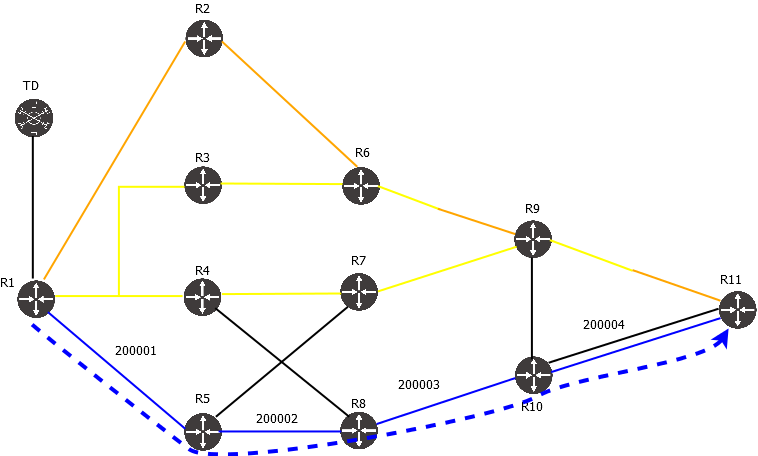
One way to steer traffic via only BLUE links is to configure affinity BLUE and use it as a constraint. An alternative way, is to use SRLG – either the same SRLG for all BLUE links (instead of affinity), or a unique SRLG per link. Config:
traffic-eng affinities
   affinity-map
   !
   srlg-map
      name SRLG100 srlg-id 100
      name SRLG_200001 srlg-id 200001
      name SRLG_200002 srlg-id 200002
      name SRLG_200003 srlg-id 200003
      name SRLG_200004 srlg-id 200004
   !
   affinity-set SRLG_200001_4
      constraint include-any
      srlg SRLG_200001
      srlg SRLG_200002
      srlg SRLG_200003
      srlg SRLG_200004
!
traffic-eng policies
   !
   policy R1_R11_SRLG_IPV4
      headend 1.1.1.1 topology-id 101
      endpoint 11.11.11.11 color 1
      install direct srte 192.168.0.101
      !
      candidate-path preference 100
         metric igp
         affinity-set SRLG_200001_4
Verify policy status:
TD1#show traffic-eng policy R1_R11_SRLG_IPV4 detail
Detailed traffic-eng policy information:

Traffic engineering policy R1_R11_SRLG_IPV4

    Valid config, Active, Installed
    Headend 1.1.1.1, topology-id 101, Maximum SID depth: 3
    Endpoint 11.11.11.11, color 1
        Endpoint type: Node, Topology-id: 101, Protocol: isis, Router-id: 0011.0011.0011.00

    Setup priority: 7, Hold priority: 7
    Reserved bandwidth bps: 0
    Install direct, protocol srte, peer 192.168.0.101
    Policy index: 10, SR-TE distinguisher: 16777226
    Route-key: [96][16777226][1][11.11.11.11]


    Candidate paths:
        Candidate-path preference 100
            Path config valid
            Metric: igp
            Path-option: dynamic
            Affinity-set: SRLG_200001_4
                Constraint: include-any
                SRLG List: [200001, 200002, 200003, 200004]
            This path is currently active

    Calculation results:
        Aggregate metric: 40
        Topologies: ['101']
        Segment lists:
            [16005, 16010, 24007]

    Policy statistics:
        Last config update: 2025-08-31 17:31:57,023
        Last recalculation: 2025-08-31 17:31:57.356
        Policy calculation took 0 miliseconds
Show policy improvements
For better serviceability, show traffic-eng policy outputs are changed and now include some extra information.
Policy route key and install status
Now TD shows not only whether the policy has been successfully calculated, but also whether it has been advertised via BGP or PCEP session:
TD1#show traffic-eng policy
Traffic-eng policy information
Status codes: * active, > installed, r - RSVP-TE, e - EPE only, s - admin down, m - multi-topology
Endpoint codes: * active override
        Policy name                             Headend             Endpoint            Color/Service loopback   Protocol             Reserved bandwidth        Priority   Status/Reason
    *>  R11_R1_BLUE_OR_ORANGE_IPV4              11.11.11.11         1.1.1.1             3                        SR-TE/indirect       100000000                 5/5        Active/Installed
    *>  R11_R1_BLUE_OR_ORANGE_IPV6              11.11.11.11         2002::1             103                      SR-TE/indirect       100000000                 5/5        Active/Installed
    *>  R1_ISP4_ANY_COLOR_IPV4                  1.1.1.1             10.100.19.104       5                        SR-TE/direct         100000000                 7/7        Active/Installed
    *>  R1_ISP4_ANY_COLOR_IPV6                  1.1.1.1             2001:100:19::104    105                      SR-TE/direct         100000000                 7/7        Active/Installed
    *>  R1_ISP5_BLUE_ONLY_IPV4                  1.1.1.1             10.100.20.105       4                        PCEP/direct          100000000                 7/7        Active/Installed
    *>  R1_ISP5_BLUE_ONLY_IPV6                  1.1.1.1             2001:100:20::105    104                      SR-TE/direct         100000000                 7/7        Active/Installed
    *>  R1_NULL_EXCLUDE_YELLOW_AND_ORANGE_IPV4  1.1.1.1             0.0.0.0             7                        PCEP/direct          100000000                 7/7        Active/Installed
    *>  R1_NULL_EXCLUDE_YELLOW_AND_ORANGE_IPV6  1.1.1.1             ::                  107                      SR-TE/direct         100000000                 7/7        Active/Installed
    *>  R1_NULL_YELLOW_ONLY_IPV4                1.1.1.1             0.0.0.0             6                        SR-TE/direct         100000000                 7/7        Active/Installed
    *>  R1_NULL_YELLOW_ONLY_IPV6                1.1.1.1             ::                  106                      SR-TE/direct         100000000                 7/7        Active/Installed
    *>  R1_R11_BLUE_ONLY_IPV4                   1.1.1.1             11.11.11.11         1                        SR-TE/direct         100000000                 7/7        Active/Installed
    *>  R1_R11_BLUE_ONLY_IPV6                   1.1.1.1             2002::11            101                      SR-TE/direct         100000000                 7/7        Active/Installed
    *>  R1_R11_EP_LOOSE_IPV4                    1.1.1.1             11.11.11.11         9                        SR-TE/direct         100000000                 4/4        Active/Installed
    *>  R1_R11_EP_LOOSE_IPV6                    1.1.1.1             2002::11            109                      SR-TE/direct         100000000                 4/4        Active/Installed
    *>  R1_R11_EXCLUDE_SOME_IPV4                1.1.1.1             11.11.11.11         10                       SR-TE/direct         100000000                 4/4        Active/Installed
    *>  R1_R11_EXCLUDE_SOME_IPV6                1.1.1.1             2002::11            110                      SR-TE/direct         100000000                 4/4        Active/Installed
    *>  R1_R11_YELLOW_OR_ORANGE_IPV4            1.1.1.1             11.11.11.11         2                        SR-TE/direct         100000000                 6/6        Active/Installed
    *>  R1_R11_YELLOW_OR_ORANGE_IPV6            1.1.1.1             2002::11            102                      SR-TE/direct         100000000                 6/6        Active/Installed
    *>  R1_R9_EP_STRICT_IPV4                    1.1.1.1             9.9.9.9             109                      PCEP/direct          100000000                 4/4        Active/Installed
    *>  R1_R9_EP_STRICT_IPV6                    1.1.1.1             2002::9             108                      SR-TE/direct         100000000                 4/4        Active/Installed
Why a policy might be not installed:
- BGP or PCEP neighbor is not configured or session is down
- PCEP neighbor did not confirm the policy status in PCReports
Note that in case of BGP, TD doesn’t know whether the neighbor accepted the policy in their inbound filter.
The “show traffic-eng policy detail” output also shows the route-key. It can be used for further troubleshooting of BGP/PCEP.
TD1#show traffic-eng policy R1_R9_EP_STRICT_IPV4 detail
Detailed traffic-eng policy information:

Traffic engineering policy "R1_R9_EP_STRICT_IPV4"

    Valid config, Active, Installed
    Headend 1.1.1.1, topology-id 101, Maximum SID depth: 10
    Endpoint 9.9.9.9, color 109
        Endpoint type: Node, Topology-id: 101, Protocol: isis, Router-id: 0009.0009.0009.00

    Setup priority: 4, Hold priority: 4
    Reserved bandwidth bps: 100000000
    Install direct, protocol pcep, peer 192.168.0.101
    Policy index: 18, SR-TE distinguisher: 16777234
    Route-key: [16777234][109][9.9.9.9]

    Binding-SID: 15008

    Candidate paths:
        Candidate-path preference 100
            Path config valid
            Metric: igp
            Path-option: explicit
                Explicit path name: R5_R8_R10
            This path is currently active

    Calculation results:
        Aggregate metric: 40
        Topologies: ['101']
        Segment lists:
            [16005, 16008, 16009]

    Policy statistics:
        Last config update: 2025-08-31 17:57:30,511
        Last recalculation: 2025-08-31 17:58:31.352
        Policy calculation took 1 miliseconds
In this case, protocol is PCEP, so we can check PCEP outputs using this route key:
TD1#show pcep ipv4 sr-te [16777234][109][9.9.9.9]
PCEP SR-TE routing table information

PCEP routing table entry for [16777234][109][9.9.9.9]
    Policy name: R1_R9_EP_STRICT_IPV4
    Headend: 1.1.1.1
    Endpoint: 9.9.9.9, Color 109
    Install peer: 192.168.0.101
    Last modified: August 31, 2025 17:58:32
      Route acked by PCC, PLSP-ID 1
      Route is delegated to this PCE
        LSP-ID     Oper status
             2      Active (2)
      Metric type igp, metric 40
      Binding SID: 15008
      Segment lists:
          [16005, 16008, 16009]
Policy view per headend
New command “show traffic-eng policy headend <headend router-id>” allows to filter the output to see all policies starting from a specific headend. For example:
TD1#show traffic-eng policy headend 11.11.11.11
Traffic-eng policy information
Status codes: * active, > installed, r - RSVP-TE, e - EPE only, s - admin down, m - multi-topology
Endpoint codes: * active override
        Policy name                             Headend             Endpoint            Color/Service loopback   Protocol             Reserved bandwidth        Priority   Status/Reason
    *>  R11_R1_BLUE_OR_ORANGE_IPV4              11.11.11.11         1.1.1.1             3                        SR-TE/indirect       100000000                 5/5        Active/Installed
    *>  R11_R1_BLUE_OR_ORANGE_IPV6              11.11.11.11         2002::1             103                      SR-TE/indirect       100000000                 5/5        Active/Installed
This provides similar user experience to configuring SR-TE policies on each router separately.
Show traffic-eng policy extensive
The “show traffic-eng policy detail” contains most of the relevant information, but for deeper troubleshooting, a new command “show traffic-eng policy extensive” has been introduced, to show more information, such as:
- Commands to check the policy on different vendor routers
- SID list specifying whether it’s prefix or adj SID
- Detailed nexthop list
Example:
TD1#show traffic-eng policy R1_R9_EP_STRICT_IPV4 extensive
Extensive traffic-eng policy information:

Traffic engineering policy "R1_R9_EP_STRICT_IPV4"

    Valid config, Active, Installed
    Headend 1.1.1.1, topology-id 101, Maximum SID depth: 10
    Endpoint 9.9.9.9, color 109
        Endpoint type: Node, Topology-id: 101, Protocol: isis, Router-id: 0009.0009.0009.00

    Setup priority: 4, Hold priority: 4
    Reserved bandwidth bps: 100000000
    Install direct, protocol pcep, peer 192.168.0.101
    Policy index: 18, SR-TE distinguisher: 16777234
    Route-key: [16777234][109][9.9.9.9]

    -----------
    IOS-XR commands:
    -----------
    show segment-routing traffic-eng pcc lsp detail | begin R1_R9_EP_STRICT_IPV4
    show segment-routing traffic-eng policy color 109 endpoint ipv4 9.9.9.9
    -----------
    JUNOS commands:
    -----------
    show path-computation-client lsp extensive name R1_R9_EP_STRICT_IPV4
    show spring-traffic-engineering lsp name R1_R9_EP_STRICT_IPV4 detail
    -----------
    EOS commands:
    -----------
    *EOS doesn't support PCEP
    -----------
    OcNOS commands:
    -----------
    show pcep segment-routing lsp brief
    show segment-routing policy detail | begin End-point 9.9.9.9
    -----------
    FRR commands:
    -----------
    show sr-te policy detail
    -----------
    Binding-SID: 15008

    Candidate paths:
        Candidate-path preference 100
            Path config valid
            Metric: igp
            Path-option: explicit
                Explicit path name: R5_R8_R10
            This path is currently active

    Calculation results:
        Aggregate metric: 40
        Topologies: ['101']
        Segment lists:
          -----------
          SID list 1:

            Segment type:   PREFIX
            Address family: ipv4
            Prefix:         5.5.5.5
            SID value:      16005

            Segment type:   PREFIX
            Address family: ipv4
            Prefix:         8.8.8.8
            SID value:      16008

            Segment type:   PREFIX
            Address family: ipv4
            Prefix:         9.9.9.9
            SID value:      16009

        Path details:

          Topology-id 101
            ---------------
            Nexthop list 1:

            0001.0001.0001.00
                [E][L2][I101][N[c65002][b0][s0001.0001.0001.00]][R[c65002][b0][s0005.0005.0005.00]][L[i10.100.3.1][n10.100.3.5][i2001:100:3::1][n2001:100:3::5]]
            0005.0005.0005.00
                [E][L2][I101][N[c65002][b0][s0005.0005.0005.00]][R[c65002][b0][s0008.0008.0008.00]][L[i10.100.9.5][n10.100.9.8][i2001:100:9::5][n2001:100:9::8]]
            0008.0008.0008.00
                [E][L2][I101][N[c65002][b0][s0008.0008.0008.00]][R[c65002][b0][s0010.0010.0010.00]][L[i10.100.12.8][n10.100.12.10][i2001:100:12::8][n2001:100:12::10]]
            0010.0010.0010.00
                [E][L2][I101][N[c65002][b0][s0010.0010.0010.00]][R[c65002][b0][s0009.0009.0009.00]][L[i10.100.21.10][n10.100.21.9][i2001:100:21::10][n2001:100:21::9]]
            0009.0009.0009.00


    Policy statistics:
        Last config update: 2025-08-31 17:57:30,511
        Last recalculation: 2025-08-31 17:58:31.352
        Policy calculation took 1 miliseconds
This is a very long output, but useful in some cases for troubleshooting.
Full config sync between controllers
TD version 1.5 introduced controller redundancy, which synchronizes config between 2 instances of Traffic Dictator. At that time, only some config sections relevant to traffic engineering were synchronized.
Starting from 1.8, all TD config is synchronized between the redundancy peers; with a few exceptions:
- SR-TE distinguisher. Backup TD will preserve configured SR-TE distinguisher during config sync. If backup TD have SR-TE distinguisher configured to “1” (default value), the backup TD will take master TD SR-TE distinguisher and increment it by 1, so that both TD have different distinguishers. See [1], [2] for more details.
- BGP router-id. Backup TD will preserve configured BGP router-id during config sync. If none is configured, the backup TD BGP process will be inactive.
- PCEP init-delay. Backup TD will preserve configured PCEP init-delay for config sync. If none is configured, it will take the master’s init-delay config and add or remove 5 seconds (depending on value), to keep it different.
This is the default behaviour now and no extra configuration is required.
Bug fixes and improvements
- Policy engine crash when both affinity and explicit path is configured, and policy fails (bug #67)
- Policy limit without a license is increased from 50 to 100. Also, installing a license requests policy reoptimization, so all policies previously rejected due to lack of license will be recalculated automatically.
- Syslog config change doesn’t update PCEP server logging (bug #68) – now PCEP logging works correctly.
- Starting from 1.0, TD collects historic show tech every hour. Now it also collects topology and policy snapshots every hour, up to 100 files. They are stored in /usr/local/td/topology-snapshots/
- Log file size has been increased from 1MB to 20MB per file, rotated up to 10 files (rotated logs are compressed).
- When affinity set is configured with “exclude-any” constraint, the link without any admin-group or SRLG attributes is now considered valid.
- PCEP update suppressed when ERO changes (bug #69) – bug introduced in 1.6 after PCEP delegation rework; fixed now.
Download
You can pull the latest TD version from Docker Hub:
sudo docker pull vegvisirsystems/td:latest
Alternatively, download the new version of Traffic Dictator from the Downloads page.