
Summary
Traffic Dictator version 1.11 has been released on 03.09.2026. This article describes changes in the new version.
New features
SRLG ignore-range
New config:
router general
   srlg ignore-range <start> <end>
TD will ignore any SRLG within this range for the purposes of disjoint-groups calculation. Therefore, it is safe to use these SRLG (within the ignore range) as path constraint under the affinity set.
Practical use case for this is interoperability with Juniper, which has a proprietary implementation of Extended Admin Group (EAG) that it advertises as SRLG TLV in IS-IS. Therefore, SRLG ignore-range should match the range Juniper uses for EAG, and TD can use them as path constraints; whereas other SRLG will be treated as regular SRLG for disjoint-groups.
Multipath limit
A new config option for policies and mesh templates to reduce the max number of multipath routes.
Policy config:
traffic-eng policies
   policy <name>
      !
      candidate-path preference <0-4294967295>
         multipath-limit <1-1>
Template config:
traffic-eng config
   template <name>
      !
      candidate-path preference <0-4294967295>
         multipath-limit <1-1>
Currently the only accepted value is 1 (i.e. disable multipath).
Note: configuring bandwidth constraint or disjoint path already disables multipath. So the multipath-limit config does nothing when bandwidth or disjoint path is used.
New config model for affinity-set
Old config model:
traffic-eng affinities
   !
   affinity-set <>
      description
      constraint [include-all|include-any|exclude-any]
      name <AG name>
      srlg <SRLG name>
New config model:
traffic-eng affinities
   !
   affinity-set <>
      description
      include [all|any]
      !
      include-affinities
	 name <AG name>
      !
      exclude-affinities
	 name <AG name>
      !
      include-srlg
	 name <SRLG name>
      !
      exclude-srlg
	 name <SRLG name>
The reasons for change are:
- It is now possible to mix include and exclude constraints within the same affinity-set: i.e. include AG1 and AG2, exclude AG3.
- Clear separation between affinities (admin groups) and SRLG – while it’s possible to mix both in one affinity-set, the new CLI is more user-friendly.
The include [all|any] option is set to “include all” by default – i.e. all AG and SRLG from the affinity-set must be present on the link in order for it to be considered for CSPF. Changing it to “include any” means at least one of the AG/SRLG must be present on the link.
The old commands are no longer accepted. However, when starting TD with startup-config with the old config format, it will be converted to the new format.
Kafka adapter
Kafka adapter allows user to stream some data from TD to a Kafka cluster. Currently TD can stream topology, policy updates and logs.
Config model:
management api kafka
   !
   producer topics
      topology-updates <topic name>
      policy-updates <topic name>
      logging <topic name>
   !
   bootstrap-server <ipv4|ipv6>
      port <1-65535>
Example:
management api kafka
   producer topics
      topology-updates TopUpd
      policy-updates PolUpd
      logging Logging
   !
   bootstrap-server 10.13.38.106
      port 9092
Check kafka adapter status:
Kafka adapter status

  Running:                       True
  Configured topics:
     Topology updates:           TopUpd
     Policy updates:             PolUpd
     Logging:                    Logging

  Configured bootstrap servers:  ['10.13.38.106:9092']
  Active bootstrap servers:      ['10.13.38.106:9092']
  Greenthreads available:        997
  Config changes queued:         0
Below are the 3 topic types that TD can stream to kafka:
Topology updates
Topology updates are streamed in the following format:
- action: “add”, “del”, “updatebw” – add, delete topology element, or update bandwidth reservation on links
- topology_id: BGP-LS topology-id
- database_name: type of topology entry, e.g. ISIS node or ISIS links. Check “show topology summary” for all possible values
- router_id: BGP/OSPF/ISIS-TE router-id or ISIS system-id
- router_json: relevant BGP-LS route in JSON format
Policy updates
Policy updates are streamed in the following format:
Where:
- action: “add” or “del”: add or remove policy
- policy_name
- policy_type: “normal” or “mesh” – is the policy configured as “policy” or generated from a mesh-template. In the future there will be more types e.g. PCC-initiated
- policy_state: JSON with all policy details. For deleted policies, policy state is empty
Logging
Standard log messages, same as sent to syslog. Example of a log message streamed to kafka:
"2026-09-02 18:56:54,369 lmk-vm102-dev-td1 WARNING: Pcep: Disabling debug for all PCEP neighbors"
Caveat: if none of the configured bootstrap servers are available, kafka adapter will be inactive and TD will not try to reconnect to it. When one server comes online, run a command “clear kafka” on TD to restart the connection.
Improvements
Better ECMP handling for SR-TE policies
TD supports ECMP and multiple segment lists with SR-TE policies since release 1.0. However, there was one caveat when there are 3 or more ECMP links between the same 2 nodes, and the SR-TE policy needs to use only some of these links.
For example:

If the path from R1 to R4 needs to use only RED links – this works fine.
However:

In this topology, if we wanted to use only RED links (i.e. ECMP across 2 RED links from R2 to R4) – older TD versions would pick only 1 link (whichever is discovered first). The algorithm is now fixed and TD uses all ECMP paths. In this scenario, ECMP will result in 3 paths:
- R1-R2-R4 (link1)
- R1-R2-R4 (link2)
- R1-R3-R4
Better loop prevention with loose explicit path
In some corner cases, explicit path loose nexthops lead to routing loops which are prohibited.
Consider the topology:
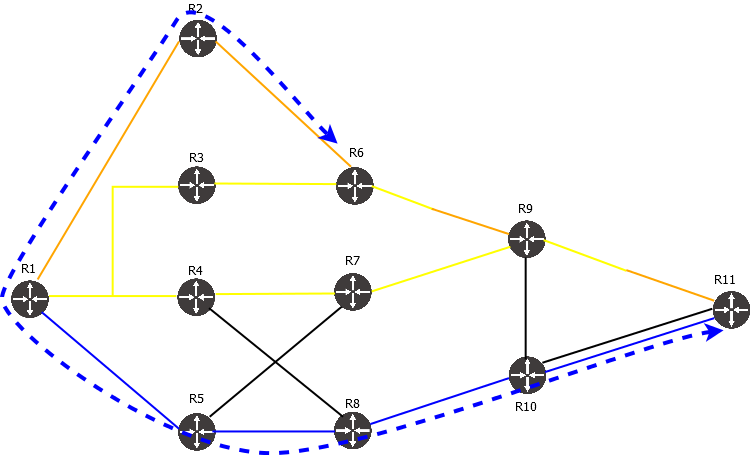
An SR-TE policy with the following properties:
- Headend = R11
- Endpoint = R6
- Path option: explicit, loose explicit path index = R2
Before 1.11, TD would resolve path to loose nexthop R2 from R11, which goes via R6. But then going from R2 to R6 would result in a loop and the candidate path would fail.
Starting from 1.11, explicit path loose also excludes headend, endpoint, all nodes already in the path and all subsequent loose nexthop. Therefore, the path from R11 to R2 will avoid R6 and the policy will succeed.
Similarly, a policy from R6 to R11 with loose explicit path index R2 will not result in a loop as shown on the diagram.
Caveat: this logic works only when multipath is disabled (“multipath limit 1” under candidate path config).
Bug fixes and minor improvements
- The “show topology” output now also displays SRLG present on the link.
- Not seeing symbols in bash shell after interrupting a long output with Ctrl-c (bug #81)
- Changed naming for policies generated from mesh-templates from “mesh_h{headend}_e{endpoint}_c{color}” to “h{headend}_e{endpoint}_c{color}” and increased column size so a typical policy name fully fits in the column
- When an ISIS/OSPF prefix is advertised to TD without a NoPHP flag, and then changed to NoPHP flag, TD doesn’t delete the prefix and keeps using it for policies. Now all prefixes with NoPHP flag are ignored (bug #78)
- Command server crash when setting syslog to log to a TCP host (bug #77)
Download
You can pull the latest TD version from Docker Hub:
sudo docker pull vegvisirsystems/td:latest
Alternatively, download the new version of Traffic Dictator from the Downloads page.