
Summary
This article describes how to deploy Traffic Dictator on a switch running IP Infusion OcNOS and establish BGP and PCEP sessions to exchange information.
Why run TD on a switch
The regular way to deploy Traffic Dictator is to install it on a dedicated server, virtual infrastructure or in the cloud. Then you need to configure BGP and PCEP sessions between TD and some routers (e.g. route reflectors) to exchange link-state information and SR-TE policies.
For example, on the topology below, R1 and R2 are connected to SW1; the switch is connected to the server on which Traffic Dictator runs in a VM.
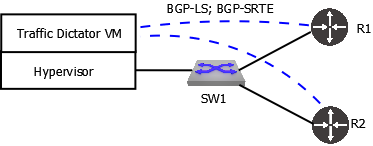
While this works fine and is recommended for most deployments, what if we have a small scale network and there is no existing VM or container infrastructure that can be used to run TD.
Rather than installing an extra server, using more ports, buying transceivers and cables, it is possible to run a Docker container with TD on a switch itself!

No extra resources, ports or cables are used. The BGP (or PCEP) session runs virtually inside the switch so it cannot go down unless either TD or host OS BGP/PCEP processes fail.
Open Networking and IP Infusion
IP Infusion OcNOS is a disaggregated network OS that can run on a variety of switches, like UfiSpace, EdgeCore, Dell etc. It’s based on Linux and supports a lot of standard Linux packages including Docker.
Unlike Arista EOS, deploying TD on OcNOS is much easier and there are no caveats with establishing BGP and PCEP sessions with the host OS.
For the demonstration I use UfiSpace S9510-28DC-B and OcNOS 6.6.0.
Installing Traffic Dictator on OcNOS
Just go to bash shell and install TD as per the standard procedure.
R3#start-shell
bash-5.2$ su
Password:
root@R3:/home/ocnos#
root@R3:/home/ocnos# docker load -i td-1.4.tar.gz
root@R3:/home/ocnos# docker run --name traffic-dictator --hostname TD1 --privileged -d td:1.4
Check that TD is running:
root@R3:/home/ocnos# docker ps -a
CONTAINER ID   IMAGE     COMMAND        CREATED              STATUS              PORTS                                        NAMES
d543e428b235   td:1.4    "/sbin/init"   About a minute ago   Up About a minute   22/tcp, 80/tcp, 179/tcp, 443/tcp, 4189/tcp   traffic-dictator
Connect to TD:
root@R3:/home/ocnos# docker exec -ti traffic-dictator /bin/bash
root@TD1:/# tdcli
### Welcome to the Traffic Dictator CLI! ###
Now let’s figure out IP addresses that we will use for BGP and PCEP sessions:
root@R3:/home/ocnos# ip ad ls | grep docker0
9: docker0: <BROADCAST,MULTICAST,UP,LOWER_UP> mtu 1500 qdisc noqueue state UP group default
    inet 172.17.0.1/16 brd 172.17.255.255 scope global docker0

root@R3:/home/ocnos# docker ps -aq | xargs docker inspect | grep IPAd
            "SecondaryIPAddresses": null,
            "IPAddress": "172.17.0.2",
                    "IPAddress": "172.17.0.2",
172.17.0.1 is the host IP address and 172.17.0.2 is the container IP address.
Establishing a BGP session between TD and OcNOS
OcNOS config:
router bgp 65002
 bgp router-id 3.3.3.3
 neighbor 172.17.0.2 remote-as 65001
 !
 address-family link-state link-state
 neighbor 172.17.0.2 activate
 exit-address-family
TD config:
router bgp 65001
   router-id 172.17.0.2
   !
   neighbor 172.17.0.1
      remote-as 65002
      address-family link-state
Verify the BGP session
On TD:
TD1#sh bgp summary
BGP summary information
Router identifier 172.17.0.2, local AS number 65001
  Neighbor             V    AS          MsgRcvd  MsgSent      InQ     OutQ      Up/Down    State          Received NLRI    Active AF
  172.17.0.1           4    65002             4        7        0        0      0:00:14    Established                0    LS
TD1#show bgp neighbors
BGP neighbor is 172.17.0.1, port 63284 remote AS 65002, external link
  BGP version 4, remote router ID 3.3.3.3
  Last read 0:00:25, last write 0:00:15
  Hold time is 90, keepalive interval is 30 seconds
  Configured hold time is 180, keepalive interval is 60 seconds
  Hold timer is active, time left 0:01:05
  Keepalive timer is active, time left 0:00:15
  Connect timer is inactive
  Idle hold timer is inactive
  BGP state is Established, up for 0:00:25
  Number of transitions to established: 1
  Last state was OpenConfirm

  Active address families:
    LS


  Other negotiated capabilities:
    route-refresh

                         Sent       Rcvd
    Opens:                  2          3
    Notifications:          3          0
    Updates:                0          0
    Keepalives:             2          1
    Route Refresh:          0          0

    Total messages:         7          4

  NLRI statistics:
                                    Sent       Rcvd
    Link-State:                        0          0
    IPv4 Labeled-Unicast:              0          0
    IPv6 Labeled-Unicast:              0          0
    IPv4 SR-TE:                        0          0
    IPv6 SR-TE:                        0          0
Local IP is 172.17.0.2, local AS is 65001, local router ID 172.17.0.2
TTL is 1
On OcNOS:
R3#show bgp link-state link-state summary
BGP router identifier 3.3.3.3, local AS number 65002
BGP table version is 1
0 BGP AS-PATH entries
0 BGP community entries

Neighbor           V    AS     MsgRcv     MsgSen  TblVer    InQ   OutQ   Up/Down  State/PfxRcd   Desc
172.17.0.2         4 65001          6          7       1      0      0  00:00:38             0

Total number of neighbors 1

Total number of Established sessions 1
R3#show bgp neighbors
BGP neighbor is 172.17.0.2, remote AS 65001, local AS 65002, external link, peer index: 2
  BGP version 4, local router ID 3.3.3.3, remote router ID 172.17.0.2
  BGP state = Established, up for 00:00:55
  Last read 00:00:15, hold time is 90, keepalive interval is 30 seconds
  Neighbor capabilities:
    Route refresh: advertised and received (new)
    4-Octet ASN Capability: received
    Address family Link-State Link-State: advertised and received
  Received 4 messages, 3 notifications, 0 in queue
  Sent 8 messages, 0 notifications, 0 in queue
  Route refresh request: received 0, sent 0
  Minimum time between advertisement runs is 30 seconds

For address family: BGP LINK-STATE  BGP table version 1, neighbor version 1
  Index 1, Offset 0, Mask 0x2
  Community attribute sent to this neighbor (both)
  Large Community attribute sent to this neighbor
  0 accepted prefixes
  0 announced prefixes

 Connections established 1; dropped 0
Local host: 172.17.0.1, Local port: 63284
Foreign host: 172.17.0.2, Foreign port: 179
TCP MSS: (0), Advertise TCP MSS: (1460), Send TCP MSS: (1460),  Receive TCP MSS: (536)
Sock FD : (27)
Nexthop: 172.17.0.1
Nexthop global: ::
Nexthop local: ::
BGP connection: non shared networkLast Reset: 00:01:00, due to BGP Notification received
Notification Error Message: (Cease/Connection Rejected.)
Establishing a PCEP session between TD and OcNOS
OcNOS config:
pce configuration 1
 capability
  segment-routing pcep
  pce instantiation
 exit-capability
  !
 update-source 172.17.0.1
 peer-address ipv4 172.17.0.2
TD config:
router pcep
   !
   neighbor 172.17.0.1
Verify the PCEP session
On TD:
TD1#show pcep summary
PCEP summary information
  Neighbor             V    Session ID      SRP ID      MsgRcvd  MsgSent      InQ     OutQ      Up/Down    State
  172.17.0.1           1    0/1             1                 5        5        0        0      0:01:13    SessionUp
TD1#show pcep neighbors
PCEP neighbor is 172.17.0.1, port 62709
  PCEP version 1
  Last read 0:00:21, last write 0:00:21
  Hold time is 120, keepalive interval is 30 seconds
  Configured hold time is 120, keepalive interval is 30 seconds
  Hold timer is active, time left 0:01:39
  Keepalive timer is active, time left 0:00:09
  Connect timer is inactive
  Idle hold timer is inactive
  PCEP state is SessionUp, up for 0:01:21
  Number of transitions to SessionUp: 1
  Last state was KeepWait

  Local session ID: 0, remote session ID: 1
  Current SRP ID: 1

  Negotiated capabilities:


                         Sent       Rcvd
    Opens:                  1          1
    Keepalives:             4          3
    PCRequests:             0          0
    PCReplies:              0          0
    Notifications:          0          0
    Errors:                 0          0
    Closes:                 0          0
    PMRequests:             0          0
    PMReplies:              0          0
    PCReports:              0          1
    PCUpdates:              0          0
    PCInitiates:            0          0
    StartTLS:               0          0

    Total messages:         5          5

  NLRI statistics:
                                    Sent       Rcvd
    IPv4 SR-TE:                        0          0
    IPv6 SR-TE:                        0          0
    IPv4 RSVP-TE:                      0          0
Local IP is 172.17.0.2
TTL is 255
On OcNOS:
R3#show pcep peer

 ===========================================
 Path Computation Client Connection Details :
 ===========================================

 PCEP entity id : 1
 ================================================
    Peer Info
    ---------------------------------------------
        PCE Server IP             : 172.17.0.2
        PCEP Source IP          : 172.17.0.1
        PCEP Local session-id     : 1
        PCEP Remote session-id    : 0
        Session Connect Retry     : 0
        Session Connect due in    : 0 sec
        OpenRetry                 : 0
        Open wait due in          : 0 sec
        Keep wait due in          : 0 sec
        Keep alive timer due in   : 26 sec
        Peer Keep-alive value     : 30 sec
        Peer Dead timer value     : 120 sec
        Peer Dead timer due in    : 116 sec
        Peer Overloaded           : No
        Peer Overload due in      : 0 sec
        LocalOK                   : 1
        RemoteOK                  : 1
        Max unknown messages      : 0
        FSM State                 : Up
        Total FSM State changes   : 4
        Peer Up time              : 00:01:34
        Flap Limit Timer value    : 300 Sec
        Local Capabilities :
          Stateful PCE Capability : Yes
          LSP Instantiation       : Yes
          SR PCE Capability       : Yes
          SRv6 PCE Capability     : No
        Remote Capabilities :
          Stateful PCE Capability : Yes
          LSP Update Capability   : Yes
          LSP Instantiation       : Yes
          SR PCE Capability       : Yes
          SRv6 PCE Capability     : Yes
Conclusion
TD running in a Docker container on a switch is an easy and lightweight method to deploy an SR-TE controller without using any extra hardware resources. Open networking OS such as OcNOS fits perfectly in this role and allows for simple and scalable traffic engineering deployments for ISPs.